
Your needs, this model
Does it fit your priorities?
Must the live picture stay on a dedicated parent screen when household Wi-Fi and internet are unavailable?
Yes. Eufy says T8301 is not Wi-Fi capable, and its model-specific setup guide pairs the camera directly to the monitor. It has no documented phone-viewing path.
Explore this need in the finder →Is phone viewing away from home essential rather than a dedicated local monitor?
No. The T8301 overview says it is not Wi-Fi capable; its own display is the viewing endpoint. Choose a documented hybrid product when remote phone access is essential.
Explore this need in the finder →Must the camera itself continue operating through a mains-power interruption?
No. The model-specific setup guide states that the camera has no internal battery and must stay plugged in. The rechargeable 2900mAh battery belongs to the parent monitor.
Explore this need in the finder →Do you need two nursery pictures at once, or is switching between cameras enough?
The overview lists one camera in the base package and up to three additional cameras. The T8301 setup guide describes manual switching and cycle mode, not split-screen.
Explore this need in the finder →Is a crib or cot mount essential for your intended placement?
The exact T8301 overview lists a crib mount and the model-specific setup page describes its use on a crib guardrail. An official EU-labeled manual instead names T8300-M/T8301-C components and lists a wall mount only. A linked U.S. manual identifies T8300-M/T8300-C. Keep this product reference-only and verify the bracket on an existing kit; do not infer a current U.S. retail box.
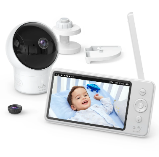
Explore this need in the finder →The eufy SpaceView S is the T8301 version of Eufy’s screen-first baby monitor. It is for a household that wants a picture on a dedicated parent monitor without Wi-Fi or a phone app. This is an earlier model reference, not a current U.S. buying recommendation: the exact U.S. support materials identify T8301, but I could not verify a current U.S. retail listing or SKU. If you already own one or are identifying a specific used kit, check both the component labels and included mount rather than treating “T8301” as a verified retail SKU.
A local screen is the only documented viewing route
Eufy’s T8301 overview says the monitor is not Wi-Fi capable. Its setup instructions pair the camera with the included parent display, so the intended plan is to look at that screen at home rather than open an app from another room or away from home. That is a useful fit if you would rather avoid network setup and phone notifications. It is the wrong fit if another caregiver needs to check the room remotely. Current hybrid alternatives such as the eufy E21 and C10 offer a separate app path as well as a local screen; their operation still depends on the mode selected and network used for remote access.
The manufacturer lists a five-inch 720p parent monitor and a 720p camera. It also lists pan and tilt, 1.5×/2× zoom, night vision, two-way talk, room-temperature information, a sound alert and a lullaby. These are specifications and feature descriptions, not tested image quality, range or alert reliability. Eufy’s overview gives a 60-degree regular lens and a 110-degree wide-angle lens; its comparison table lists a different regular-lens angle. The U.S.-linked PDF identifies T8300-M and T8300-C, while a separate multilingual manual in the official SpaceView S support documents identifies T8300-M and T8301-C. Neither manual settles the standard-angle conflict: the U.S.-linked PDF identifies the earlier camera, and the S overview conflicts with Eufy’s comparison table. The wide view is consistently listed as 110 degrees.
Camera power and screen battery are separate
The T8301 setup guide says its camera has no internal battery and must remain plugged into the supplied adapter. The rechargeable 2900mAh battery is in the parent monitor. Eufy estimates eight hours with the display on and fifteen hours in default sleep, but those are manufacturer figures rather than a guaranteed minimum. Taking the parent screen from room to room is not the same as keeping the camera alive during a power cut. If camera-side battery backup is essential, the E21 is a more relevant current comparison; check its separate review for the exact camera and operating modes.
One included camera; later cameras are selected in turn
Eufy’s T8301 overview lists one camera in the package and says up to three additional SpaceView cameras can pair. The product-specific setup guide describes pressing a control to switch cameras or choosing a cycle interval. It does not describe simultaneous split-screen. Therefore, the T8301 is a one-room picture at a time, not a two-room dashboard merely because another camera can be added. If both rooms must stay visible, choose a model and exact camera-count kit that explicitly documents split-screen, such as a verified two-camera VTech VM350-2 package.
The crib mount is the T8301 distinction—but check a used kit
Eufy’s T8301 overview lists both a wall mount and a crib mount, and calls the crib mount the sole difference from the earlier SpaceView. A separate setup guide for SpaceView S describes fitting the bed mount to a crib guardrail. A multilingual manual listed among Eufy’s official SpaceView S documents identifies the monitor as T8300-M and the camera as T8301-C. Its box panel lists a wall mount but not the crib mount, and gives a different parent-adapter rating from the overview. The U.S.-linked manual, meanwhile, identifies T8300-M/T8300-C. These documents establish useful component-label clues, but they do not establish one universal T8301 retail package: the U.S. support page’s attached manuals disagree, and the model-specific overview/setup say the crib mount is part of the S. For an existing or second-hand kit, check the monitor and camera labels and confirm the bracket is actually present; use the T8301-specific mounting instructions and keep cords out of reach.
Who should keep looking?
The T8301 does not document a phone feed, camera battery backup, simultaneous room view or video storage. Its sound alert is not described as a distinct cry-recognition system, and no exact U.S. range or guaranteed screen-on runtime was established. Those unknowns matter more than a long feature list if they are essential to your routine. For a present-day purchase, compare current models by whether you need a local screen, a remote app, camera-side backup, simultaneous views or a particular mount. For an existing SpaceView S, identify the product as T8301 and check which accessories and camera are actually in your set before buying replacements. The SpaceView S and T8300 comparison explains their documented differences.
Manufacturer source basis: Eufy’s SpaceView S support record, T8301 product overview, and T8301 setup guide. The U.S.-linked PDF identifies T8300-M/T8300-C. A separate multilingual EU-labeled SpaceView S manual identifies T8300-M/T8301-C but lists a wall mount rather than the crib mount in the overview. These manual records are useful for component identification, not proof of a current U.S. retail SKU or a universal box configuration. This assessment reports manufacturer claims and instructions, not ownership or laboratory testing.
Key details at a glance
| Parent-unit screen | 5 in |
|---|---|
| Published display resolution | 720p |
| Camera-to-parent-unit connection | Direct camera-to-dedicated-monitor viewing; the T8301 overview says it is not Wi-Fi capable and no phone or internet view is documented. |
| Cameras in the reviewed kit | 1 |
| Maximum camera units supported | 4 |
| Video rooms visible at once | 1 |
| Phone viewing away from home | No |
| User-replaceable parent-unit battery | No |
| Supplied camera lens setup | T8301 overview lists 60° regular and 110° wide-angle lenses; its comparison table gives 50° standard view, while the linked PDF says 62° but identifies T8300-M/T8300-C. The T8301 standard-angle value is unresolved; wide-angle 110° is the consistent T8301 overview claim. |
| Recommended stable operation uses home Wi-Fi | No |
| Audio-only system | No |
| Parent talk-back | Yes |
| Room-temperature readout | Yes |
| Included crib-mount option | Yes |
| Supplied camera mount | The T8301 product overview lists a wall mount and a crib mount, and the T8301 setup guide gives a crib-guardrail bed-mount procedure. The PDF linked from the support record internally identifies T8300-M/T8300-C and lists only a wall mount, so that mismatched PDF is not used to negate the T8301-specific overview/setup evidence. Check the mount is present on any existing kit. A multilingual EU-labeled manual in the official SpaceView S support documents lists a wall mount but not the crib mount described by the exact T8301 overview/setup pages; verify the physical bracket on any existing kit. |
| Parent receivers included | 1 |
Use the exact model’s instructions for operating limits, supplied equipment and version differences.
Sources for this assessment
- eufy SpaceView S Baby Monitor support record
- Introducing the SpaceView S Baby Monitor
- Setting Up the SpaceView S Baby Monitor
- PDF linked from the SpaceView S U.S. support record (content identifies T8300)
- Differences Between eufy Video Baby Monitors
- eufy U.S. Baby Monitor collection snapshot
- Former T8301 U.S. product route observation
- T8301 column image in eufy monitor comparison
- SpaceView S Baby Monitor manual (EU-labeled multilingual manual)
Check the room and the receiving setup.
Read the exact model's constraints, camera count and supervision limits before choosing a package.