
Your needs, this model
Does it fit your priorities?
Must one included camera keep a live picture on the dedicated monitor when Wi-Fi and internet are unavailable?
The T6310 guide documents direct camera-to-monitor viewing without Wi-Fi; in that arrangement the live picture stays on the monitor, not a phone. The exact base kit includes one camera and one parent monitor.
Explore this need in the finder →Will you need phone viewing away from home and a cry-detection alert in the connected setup?
C10's Anker eufy app/Wi-Fi path adds remote phone viewing, and official support lists cry detection. The eufy Baby app is incompatible; the offline local plan does not promise app-dependent detection.
Explore this need in the finder →Must the camera itself keep working if mains power is lost, rather than relying on a battery-powered parent display?
No. The parent display has a 5,000mAh battery and an up-to-12-hour manufacturer screen-time claim, but Eufy states that the camera has no built-in battery and needs continuous wired power. The parent-screen claim is an upper-limit estimate, not evidence of a six-hour minimum.
Explore this need in the finder →Must the exact kit include two cameras for two pictures at once?
A C10 monitor can pair with a second C10 camera, but the reviewed base kit contains one. Split-screen expansion requires buying an additional camera; simultaneous audio from both rooms is not established.
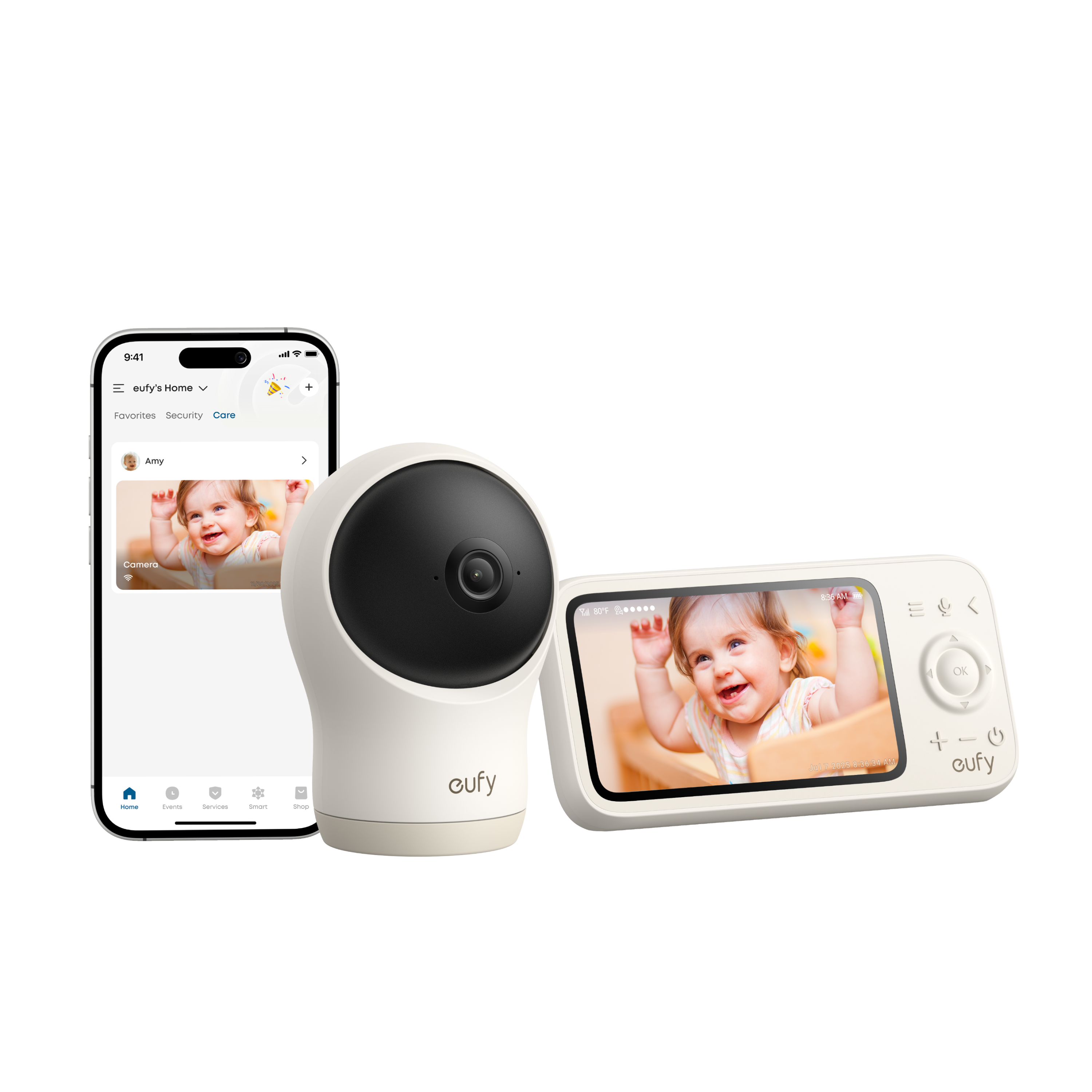
Explore this need in the finder →The eufy Baby Monitor C10 is a hybrid camera-and-screen system with two different power stories: its parent monitor has a built-in rechargeable battery, while the camera needs a continuous wired supply. That split is easy to miss in a headline about a 5,000mAh battery. It makes the C10 most relevant to a household that wants to carry the parent display around the home and keep a camera fixed near an outlet, not to someone who wants to move the camera between rooms without reconnecting power.
A one-camera kit with a smaller parent display
The current U.S. product page identifies the full kit as eufy Baby Monitor C10, SKU E6310121; the manufacturer support record identifies the camera as T6310. The linked guide's Monitor + Camera box list contains one camera, one monitor, their power cables, two adapters, a wall mounting plate, screws and a quick-start guide. This is not the separate C10 Add-On Camera listing. The base package therefore covers one room; its ability to pair another C10 camera does not mean a second camera is in the box.
Eufy specifies a 2K camera with 351-degree pan, 60-degree tilt and 4× zoom. The separate 4.5-inch monitor is listed as 480p. Those are two different parts of the system: the 2K figure describes the camera, not the monitor panel. The product page advertises split-screen viewing with two cameras, while the C10 support material says a monitor can pair with up to two C10 cameras. A second camera must be purchased separately. If both pictures are shown, the audio follows the selected view; the manufacturer documents optional event-triggered audio switching, not two continuously audible room feeds.
Local monitor first, app when you want it
The camera and monitor are paired out of the box. The user guide says a direct local connection can show live video on the parent monitor without Wi-Fi. In that arrangement, the phone does not receive the feed. For viewing away from home, add the camera to the Anker eufy app and connect the system to a home Wi-Fi network with internet access. Eufy's setup help specifically says the eufy Baby app is not compatible with C10; the product page also calls for app version 5.6.0 or newer. That app difference matters if a household is comparing it with E20 or E21 instructions.
Eufy gives an up-to 800-foot local connection figure in an open environment with minimal interference. Walls, other wireless equipment and room layout can shorten usable indoor reach, so treat that as a manufacturer ceiling, not a promise for a particular house. The monitor's Smart Connect setting can switch to Wi-Fi data transmission when the direct signal is weak; the guide describes this setting as enabled by default. If a no-router routine is essential, check how the selected setup behaves in the intended rooms and do not assume that app features remain active while offline.
The screen battery does not power the camera
Eufy states that the parent display's 5,000mAh built-in battery provides up to 12 hours of screen time in its internal testing; actual runtime may vary. Support says the monitor battery is not replaceable and is charged over USB-C. This is a manufacturer claim, not a battery test performed for this review. The camera is the opposite: Eufy says it has no built-in battery and needs continuous wired power. Its USB-C power cable and adapter are part of the listed kit. A portable screen can be useful as a caregiver moves around, but a camera-side outage still stops the camera unless some external wired source remains available.
The C10's camera can be placed on a shelf or wall, and the manual describes a cradle-mount option. That mounting hardware is not in the Monitor + Camera box list, so verify the exact package if crib mounting is a must-have rather than assuming a mount pictured elsewhere is included. The manual's placement steps and the U.S. Consumer Product Safety Commission's baby-monitor cord guidance both make cable routing important: keep cords out of a child's reach and use the exact mounting instructions.
Alerts, recording and the practical limits
The manufacturer lists crying, loud-sound, motion and temperature detection. Its help pages describe sensitivity and notification settings in the app, with alert controls on the monitor as well. The app-based detection setup is not evidence that every alert works in every offline configuration, and no alert accuracy or medical monitoring claim is made here. A room-temperature display or a motion prompt can help someone decide when to check the room; it is not a clinical measurement or a substitute for direct supervision.
Eufy also lists 24/7 recording to a microSD card up to 128GB. The card is not included, and recordings are described as locally stored. Factor in the separate card and setup if continuous history matters. If you only need a live picture, local monitor viewing is simpler; if you need saved clips or phone alerts, confirm the network and app configuration first.
The C10 suits a buyer who values a rechargeable parent display, motorized framing, an optional app route and a one-room local screen setup. It is a poor fit when a battery-powered camera, an included crib clamp, a two-camera box or known simultaneous sound from two rooms is essential. Compare the current eufy E21 review if the camera itself needs battery backup; its camera battery and parent-screen runtime are different facts. The E20/E21 family comparison guide also explains why the older E20 is an owner reference rather than a current buying suggestion. For a strict two-room kit, use the camera-count and simultaneous-view questions rather than counting a separately sold accessory.
Source detail: current U.S. C10 product page, C10 support record, the linked T6310 user guide, Eufy's C10 app setup, detection guidance, camera power FAQ, monitor battery FAQ, local-range FAQ, two-camera guidance, dual-camera audio guidance, and the CPSC cord-safety alert. Feature statements are manufacturer descriptions, not independent performance measurements.
Key details at a glance
| Parent-unit screen | 4.5 in |
|---|---|
| Published display resolution | 480p |
| Camera-to-parent-unit connection | Direct local camera-to-monitor viewing works without Wi-Fi; optional home Wi-Fi and internet with the Anker eufy app add remote phone viewing. The eufy Baby app is not compatible with C10. |
| Manufacturer-stated open-space range | 800 ft |
| Advertised maximum range claim | 800 ft |
| Cameras in the reviewed kit | 1 |
| Maximum camera units supported | 2 |
| Video rooms visible at once | 1 |
| Phone viewing away from home | Yes |
| User-replaceable parent-unit battery | No |
| Supplied camera lens setup | 2K HD camera with 351-degree panoramic pan, 60-degree tilt and 4× zoom. The manufacturer does not identify the zoom type; no independent image-quality measurement is claimed. |
| Recommended stable operation uses home Wi-Fi | No |
| Audio-only system | No |
| Parent talk-back | Yes |
| Room-temperature readout | Yes |
| Included crib-mount option | No |
| Supplied camera mount | The Monitor + Camera box list includes a camera wall-mount plate and screws. The T6310 guide describes a cradle-mount option but does not list cradle hardware in the base box contents; verify a separate mount if crib attachment is essential. |
| Parent receivers included | 1 |
Use the exact model’s instructions for operating limits, supplied equipment and version differences.
Sources for this assessment
- eufy U.S. Baby Monitor collection snapshot
- eufy Baby Monitor C10 exact U.S. product page
- eufy Baby Monitor C10 support record, camera model T6310
- eufy Baby Monitor C10 User Guide (T6310)
- eufy C10 initial app setup
- eufy C10 detection and notification support
- Does the C10 camera have a built-in battery?
- Can the C10 monitor battery be replaced?
- C10 local connection range
- C10 pairing multiple cameras to one monitor
- C10 dual-camera audio switching
- Differences between eufy E20/E21 and C10
- eufy C10 exact U.S. product-page image
- eufy C10 Add-On Camera separate product page
- U.S. CPSC Baby Monitor Cord Safety Alert

Check the room and the receiving setup.
Read the exact model's constraints, camera count and supervision limits before choosing a package.