
Your needs, this model
Does it fit your priorities?
Would you use a dedicated parent screen even if the home Wi-Fi or internet is unavailable?
Yes. The V6 guide describes the local camera-to-parent link separately from app setup. This one-camera kit can supply the local picture and sound without using the router; choose the phone app only when its additional network and account setup suits your routine.
Explore this need in the finder →Must you be able to check the camera from a phone or tablet while away?
The app route is documented, but it needs camera Wi-Fi setup, an account, internet access for remote viewing, a compatible phone or tablet and the guide-listed upload bandwidth. The direct parent screen is a separate route that works without the router.
Explore this need in the finder →Does the exact box need to cover two rooms at the same time?
No. The exact U.S. product record is one model variant and the V6 guide's standard package list has one camera. The advertised four-camera ceiling is not the included quantity, so this exact kit cannot satisfy a two-camera minimum.
Explore this need in the finder →Is a stated minimum of four continuous screen-on hours essential?
The manufacturer documents different parent-unit operation figures on the store page and U.S. quick-start sheet, but neither establishes a controlled screen-on duration. Leave the strict runtime minimum unmatched rather than treating a general playtime claim as a continuous-video guarantee.
Explore this need in the finder →A high-resolution touchscreen with two distinct ways to view
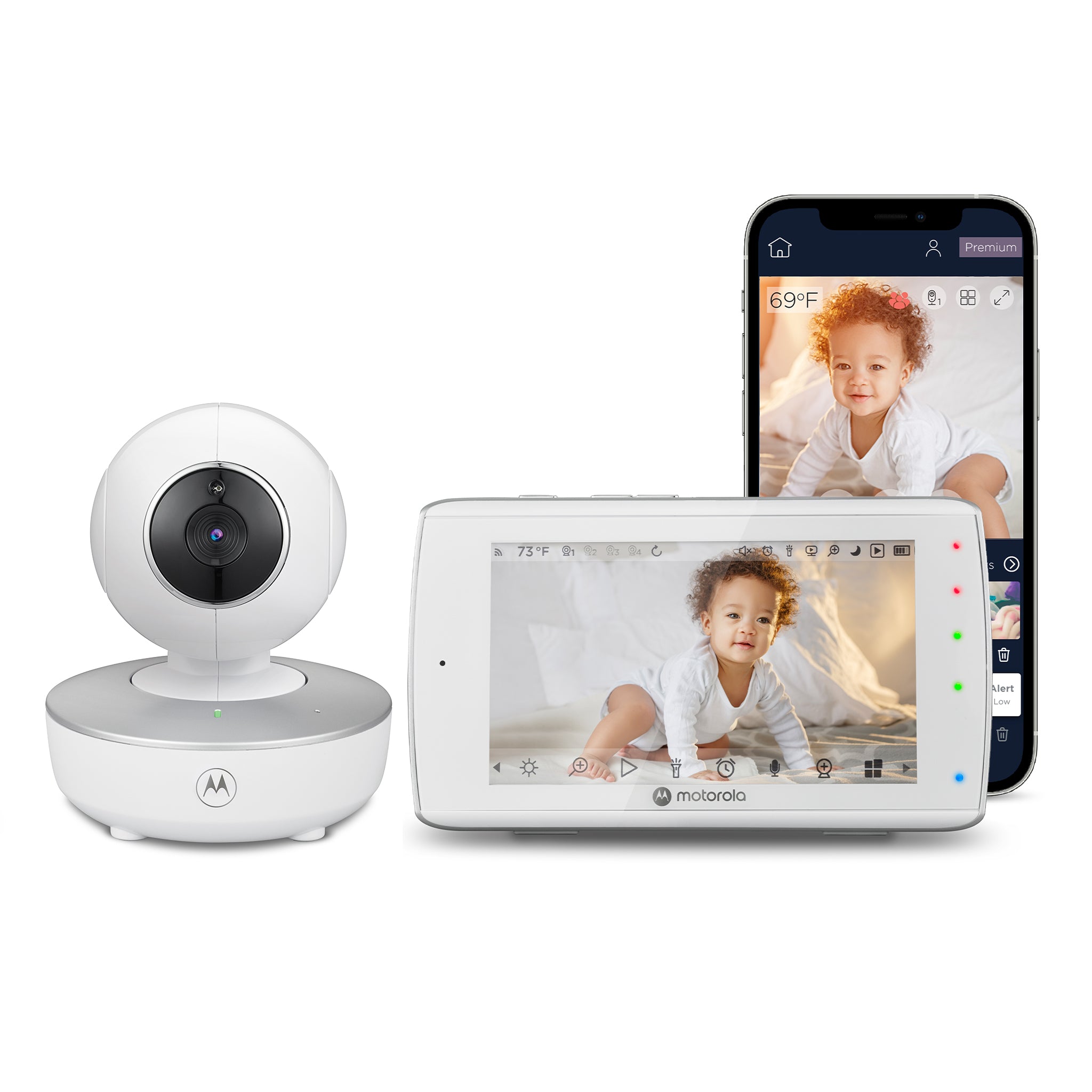
The Motorola VM36XL TOUCH CONNECT is a hybrid video monitor: its exact U.S. package has one camera and one five-inch parent screen, while the camera can also join the Motorola Nursery app for phone or tablet viewing. The receiver is a 1280 × 720 color touchscreen, a substantial resolution difference from the 480 × 272 display in the non-connected VM36XL family. This is the model’s clearest reason to choose it: you get a sharper local screen without making the phone app your only way to see the room. Motorola’s U.S. product record identifies SKU 810036771986, and its linked guide’s standard box list contains one camera; it describes extra cameras as an added multi-camera package, not as part of this base kit.
The same product page calls this a previous model offered while supplies last. Its product record was available when archived, but that is a dated stock status, not a promise of continuing supply. Treat it as an earlier model in the finder, and confirm that any listing is this exact touchscreen CONNECT version rather than the visually similar, non-connected VM36XL.
Keep the local screen separate from the app setup
The local 2.4 GHz FHSS feed from camera to parent unit works without the router, app account or internet. Remote viewing is separate: connect the camera to Wi-Fi and configure the Motorola Nursery app on a compatible phone or tablet, then use the account and internet while away. The V6 manual lists Android 7.0/iOS 10 and at least 0.6 Mbps upload per camera; these are dated baselines, so check current app compatibility before relying on a phone.
This hybrid suits a household that wants a no-router local screen at home and can benefit from occasional remote phone access. The app adds account and network dependencies; it does not improve the direct local link. It is not phone-only, and a Wi-Fi outage means relying on the parent screen rather than the app.
The camera is not the portable part
Motorola lists remote pan and tilt plus 4× digital zoom, and the guide describes swipe controls for moving the camera view. Use that movement to adjust the room picture from the receiver; it does not replace choosing and securing a safe camera position. More importantly, the manual says the baby unit must remain plugged into its supplied wall adapter. The camera is not specified for battery-only use. That separates the TOUCH CONNECT from the ordinary VM36XL, whose camera has its own limited rechargeable backup. If you need a camera that can be carried briefly to another room without an outlet, the older local VM36XL family is a more relevant comparison—but its parent display is lower resolution and it lacks the phone-app path.
The parent unit does contain a 2,000 mAh rechargeable battery. Motorola’s current U.S. shop specifications say 4.5 hours of playtime, while the support-linked North American quick-start guide says the battery gives up to five hours of operation. The guide does not establish a controlled continuous-screen test, so a strict screen-on runtime minimum remains unknown; battery capacity or the higher claim should not be mistaken for verified all-night viewing. The parent guide recommends a 16-hour first charge. If uninterrupted video runtime is an essential threshold, do not count the screen-off timer as equivalent: the manual says the display can turn off after a set interval while audio continues.
Single-camera package, multi-camera ceiling
The receiver can connect up to four cameras, and the guide describes split-screen viewing and patrol mode, which changes views every 12 seconds once additional cameras are paired. Those family capabilities do not change this SKU’s one-camera box: the reviewed U.S. package supplies one room picture and its selected audio. For two views from the start, compare an exact twin package and check its audio behavior; split pictures alone do not establish two simultaneous sound feeds.
The camera also supplies infrared night vision, room-temperature sensing, and a speaker. The product page lists app motion, sound and temperature notifications, but does not specify thresholds or detection reliability. The guide describes two-way talk, ten lullabies or soothing sounds, ten English audio books and personal audio that can be recorded through the app and played by the camera. Talk-back is push-to-talk: the manual says you cannot hear the nursery while holding the talk control. These comforts are secondary to the core view plan; they do not turn the monitor into a medical or cry-diagnostic device.
Who should choose it—and who should pass
This earlier model suits a household that values a five-inch, high-resolution touchscreen receiver, wants a direct local feed without Wi-Fi, and also has a reason to use app access away from home. It is a weaker fit if camera portability, a guaranteed continuous-screen battery duration, phone-only operation, or two included cameras are essential. The advertised 1,000-foot FHSS range is a manufacturer maximum; the guide warns that walls, metal and nearby 2.4 GHz devices can reduce reception, and it supplies no open-space test protocol. Test the receiver at the intended location instead of planning from that number alone.
Compared with the VM36XL family, the TOUCH CONNECT adds the sharper screen and optional app route but requires its camera to stay powered. Choose the standard VM36XL for a lower-resolution local screen and camera backup; the two-camera VM36XL-2 Twin Pack gives split pictures without app access. The family comparison explains the camera-count and audio limits.
Follow the exact guide’s cord-distance and placement instructions: keep the camera and power cord more than three feet from the child and outside the crib. A monitor is an aid, not a replacement for adult supervision or safe-sleep practice. Sources: Motorola Nursery U.S. listing, VM36XL TOUCH CONNECT support page, the English User Guide V6 and the North American Quick Start Guide V5.
Key details at a glance
| Parent-unit screen | 5 in |
|---|---|
| Published display resolution | 5-inch color touchscreen, 1280 × 720 pixels on the dedicated parent unit. Motorola separately advertises up to 720p through the app; the advertised resolution is not a measured stream result. |
| Camera-to-parent-unit connection | Two separately documented arrangements: the camera sends a local 2.4 GHz FHSS feed to the dedicated parent screen without home Wi-Fi, or it is configured on a Wi-Fi router for Motorola Nursery app access. Away-from-home phone viewing needs internet, a compatible phone or tablet, account setup and the manual-listed upload bandwidth. |
| Advertised maximum range claim | 1000 ft |
| Cameras in the reviewed kit | 1 |
| Maximum camera units supported | 4 |
| Video rooms visible at once | 1 |
| Phone viewing away from home | Yes |
| Supplied camera lens setup | Manufacturer lists remote camera pan and tilt plus 4× digital zoom; the parent touchscreen uses swipe controls for pan and tilt of the camera view. The review treats the movement as a manufacturer-stated feature, not a tested room-coverage result. |
| Recommended stable operation uses home Wi-Fi | No |
| Audio-only system | No |
| Parent talk-back | Yes |
| Room-temperature readout | Yes |
| Parent-unit batteries included | Yes |
| Preloaded lullaby count | 10 |
| Parent receivers included | 1 |
Use the exact model’s instructions for operating limits, supplied equipment and version differences.
Sources for this assessment
- Motorola Nursery exact U.S. VM36XL TOUCH CONNECT product listing
- Exact U.S. Shopify product record
- Motorola Nursery VM36XL TOUCH CONNECT manufacturer product page
- Motorola Nursery product support Ref 810036771986
- VM36XL TOUCH CONNECT User Guide V6 English
- VM36XL TOUCH CONNECT North American Quick Start Guide V5
- Motorola Nursery exact-model primary product image
- SaferProducts exact-name CPSC recall query
- VM36XL-2 TOUCH CONNECT exact-name U.S. search and inferred-route observations
- VM36XL-3 TOUCH CONNECT exact-name U.S. search and inferred-route observations
- VM36XL-4 TOUCH CONNECT exact-name U.S. search and inferred-route observations

Check the room and the receiving setup.
Read the exact model's constraints, camera count and supervision limits before choosing a package.