
Your needs, this model
Does it fit your priorities?
Can one camera on a five-inch dedicated screen cover your ordinary local-room needs without router setup?
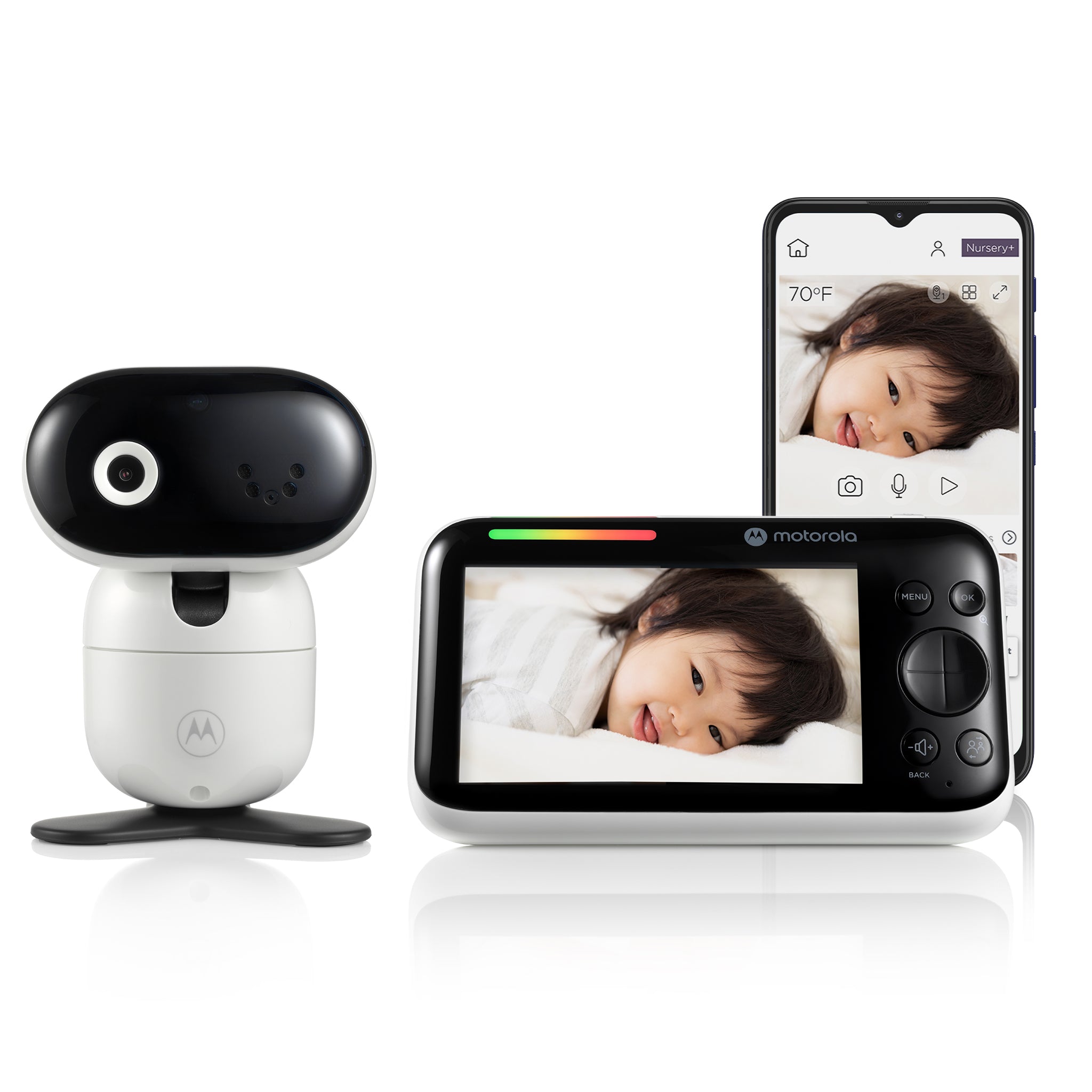
The exact single-camera kit includes one camera and a 5-inch 720p parent display linked over local FHSS. Wi-Fi is not required for this viewing plan.
Explore this need in the finder →Would one selected camera in the app be enough, rather than needing two remote room pictures at once?
Motorola lists an app remote-viewing path for the single included camera, but the exact guide does not establish a two-room simultaneous app setup.
Explore this need in the finder →Would app motion notifications help even though the receiver motion-alert mode is not documented?
The product listing describes app motion notifications, but the user guide does not establish a motion alert on the dedicated receiver. Those notification paths are not interchangeable.
Explore this need in the finder →Does the monitor need to guarantee at least six hours with the screen continuously on?
The manual gives up to six hours of battery use in ideal conditions but no continuous-screen runtime condition.
Explore this need in the finder →A local screen and an optional phone path in one one-camera kit
The Motorola PIP1610 HD CONNECT is the one-camera member of Motorola’s connected PIP1610 family. The U.S. listing’s variant data identifies the single-camera kit as SKU 810036772792; the separate two-camera package is SKU 810036772884 and has its own review. At the time of inspection, Motorola called the model a previous model but the single-camera variant remained available to add to cart. This is not the same product as the non-connected PIP1610 HD: CONNECT adds a Wi-Fi camera path and Motorola Nursery app, while retaining a dedicated parent screen and a direct local camera-to-screen link.
That gives the household two different ways to check in, but they have different requirements. The included five-inch, 1280 × 720 parent display uses 2.4 GHz FHSS for in-home viewing; that local mode does not need the house router or internet. The camera can also be configured for the app, which enables viewing from a compatible phone or tablet away from home. For this route Motorola’s guide requires Android 7 or later or iOS 10 or later and at least 0.6 Mbps of upload bandwidth per camera. A local receiver is the simpler plan if a phone feed is not essential. Choose the app path only if your Wi-Fi reaches the camera location and the phone-based access is worth the added network and account setup.
Remote app features are not the same as a parent-unit motion alarm
The camera’s motorized pan, tilt and zoom can be adjusted from the parent unit, and the listing describes app viewing at up to Full HD 1080p. The dedicated receiver itself is listed as 720p. Motorola also lists infrared night vision, two-way talk, room-temperature monitoring, and a sound-level indicator on the parent screen. The app listing adds motion, sound and temperature detection notifications and event monitoring. Those are useful distinctions when answering a questionnaire: phone access should be selected for away-from-home viewing, while a separate local-screen need can still be met without Wi-Fi.
Do not treat the app’s detection notifications as proof of a motion alarm on the dedicated receiver. The user guide explains the parent display and manual camera controls but does not document an on-screen motion-alert function for this kit. I leave that particular matching fact unknown rather than translate app language into a different alert mode. The app’s notification thresholds and the conditions for continued event access are also not fully specified in the guide. Similarly, the room-temperature readout is a convenience feature, not a calibrated or medical measurement.
Plan on wall power for the camera and keep battery claims in context
The camera must be connected to its supplied AC adapter according to the English user guide, even though the listing does not make that dependence as prominent as the camera’s wireless features. The parent display has a built-in rechargeable 2,800 mAh battery. Motorola says it provides up to six hours of playtime or use in ideal conditions, but neither the listing nor the guide specifies a continuous screen-on test. If an all-night screen-on minimum is essential, this figure does not establish it. The manual says an initial parent-unit charge should run for at least 16 hours and advises contacting customer service if the battery eventually needs replacement; this is not a user-replaceable battery.
The page advertises up to 1,000 feet for the local radio connection. The guide warns that walls, metal objects and nearby 2.4 GHz equipment can reduce reception, but provides no numeric open-space range protocol. Treat the headline as a manufacturer maximum, not a measured distance for a particular home. With the app route, camera placement also needs suitable Wi-Fi coverage and the required upload bandwidth. Test the actual camera and receiver positions rather than assuming that the display’s signal or router coverage will carry through multiple floors.
Choose the standard kit when one camera is enough
For one nursery, the standard package keeps the kit count clear: one camera and one parent screen. The shared family guide describes pairing additional camera units, split-screen and camera cycling, but those functions do not mean a second camera comes in this box. If you need both pictures at once from the start, compare the separately listed PIP1610-2 HD CONNECT Twin Pack. It includes two cameras and its listing advertises split-screen. If local viewing only is enough and you do not want to configure a phone app, compare the non-connected PIP1610 HD, which is a different one-camera package without documented phone viewing.
For a finder result, the standard CONNECT is a fit when a household needs a five-inch local screen, one active room picture, and optionally away-from-home phone viewing. Choosing dedicated-screen mode selects the FHSS plan; choosing phone-remote mode requires the Wi-Fi app plan. A second-room-at-once request should move the result to a verified multi-camera package, while a strict screen-on runtime or tested open-space range requirement should reject this model because those figures remain unverified. The monitor is an aid only; keep camera cords and equipment safely out of reach and follow the manufacturer’s placement instructions.
Sources: Motorola U.S. PIP1610 HD CONNECT listing, Motorola PIP1610 HD CONNECT support page, and the linked English User Guide V2 and North American Quick Start Guide V4.
Key details at a glance
| Parent-unit screen | 5 in |
|---|---|
| Published display resolution | 5.0-inch IPS color parent display, 1280 × 720 pixels (manufacturer U.S. listing); up to Full HD 1080p is listed for Wi-Fi app camera video, not the parent screen. |
| Camera-to-parent-unit connection | Two distinct paths: direct 2.4 GHz FHSS to the five-inch parent screen for in-home use, or Wi-Fi camera connection for Motorola Nursery app viewing. The local screen path does not need Wi-Fi; away-from-home app access does. |
| Advertised maximum range claim | 1000 ft |
| Cameras in the reviewed kit | 1 |
| Maximum camera units supported | 4 |
| Video rooms visible at once | 1 |
| Phone viewing away from home | Yes |
| User-replaceable parent-unit battery | No |
| Supplied camera lens setup | One included motorized camera with parent-unit remote pan, tilt and zoom; the manufacturer also lists app controls. Infrared night vision. |
| Recommended stable operation uses home Wi-Fi | Yes |
| Audio-only system | No |
| Parent talk-back | Yes |
| Room-temperature readout | Yes |
| Parent receivers included | 1 |
Use the exact model’s instructions for operating limits, supplied equipment and version differences.
Sources for this assessment
- Motorola U.S. PIP1610 HD CONNECT listing
- Motorola Nursery product support for PIP1610 HD CONNECT, productId 8619
- Motorola PIP1610 HD CONNECT English User Guide V2
- Motorola PIP1610 HD CONNECT North American/UK Quick Start Guide V4
- CPSC SaferProducts exact PIP1610 HD CONNECT query
- Motorola exact PIP1610 HD CONNECT image from its U.S. listing

Check the room and the receiving setup.
Read the exact model's constraints, camera count and supervision limits before choosing a package.