
Your needs, this model
Does it fit your priorities?
Can two included cameras show two rooms together when one selected audio feed is enough?
Yes. The exact twin kit includes two cameras and the manual supports two simultaneous pictures, with one camera's audio selected at a time.
Explore this need in the finder →Will the twin give me two local pictures and camera movement without requiring Wi-Fi?
Yes. The direct local setup shows two pictures and offers remote pan/tilt; it still plays sound from only one selected camera at a time.
Explore this need in the finder →Does the manufacturer document enough open-space range for a 950-foot threshold?
Yes, up to 980 feet in unobstructed open space; that is not a claim about indoor household reach.
Explore this need in the finder →The twin package is the PRO configuration for two rooms
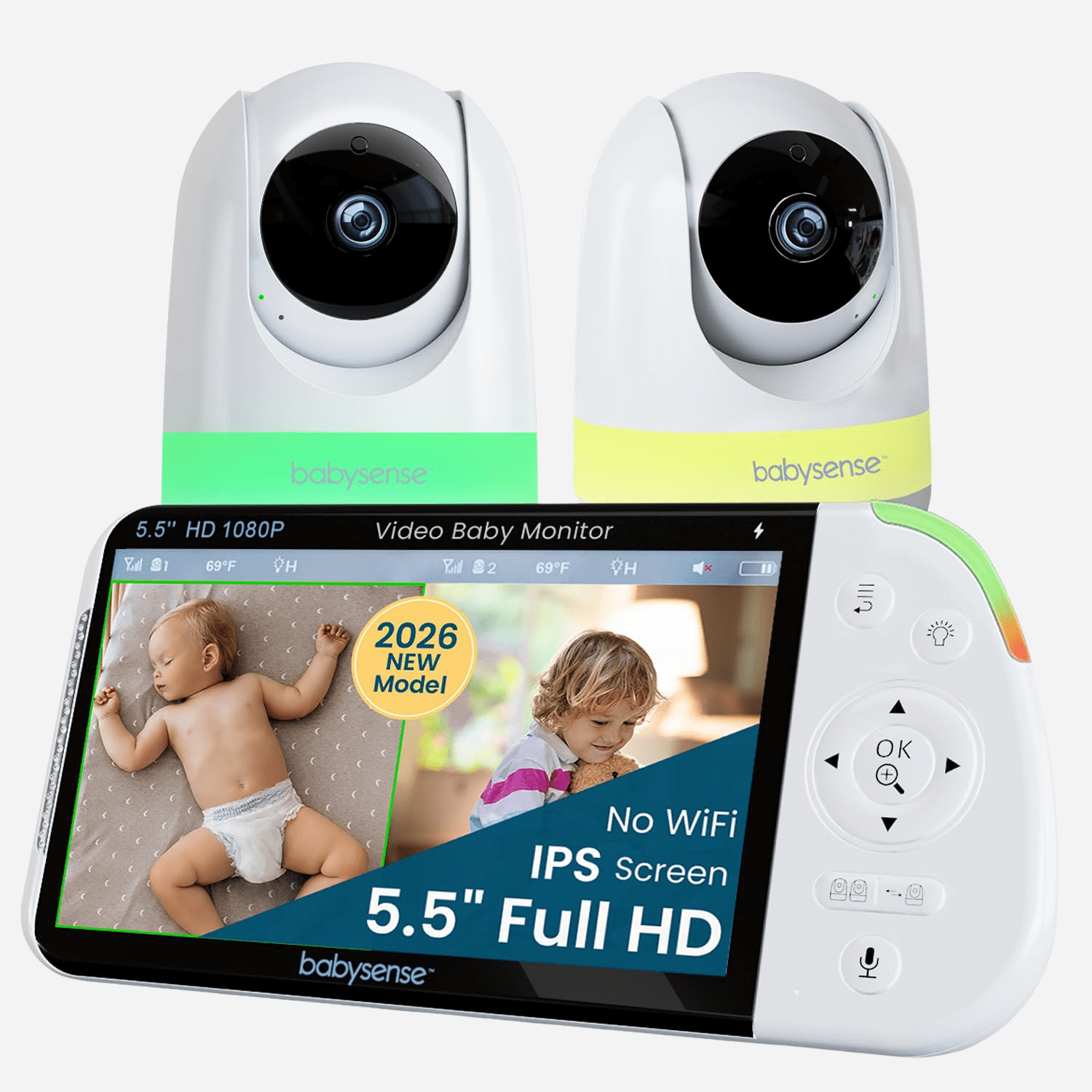
This assessment is for the Babysense PRO two-camera package, an exact U.S. listing with SKU MVPRO-2CAM USA. Its page calls the parent-unit configuration MaxView-2CAM; the shared official user guide identifies the monitor family as VBMN55 and covers both one- and two-camera packages. The manual's two-camera contents are one parent unit, two camera units, three AC adapters, two wall-mount screw sets and the user guide. That is materially different from the separate one-camera package: two cameras are present here without having to count a future add-on as part of the original kit.
The camera quantity matters because the 5.5-inch screen can show two paired cameras side by side. This is a local video setup for parents who want two room pictures available on one receiver rather than carrying a phone or switching between separate screens. Its maximum pairing figure of four cameras is not four included units or four simultaneous screen tiles. With the two cameras in the reviewed package, you can see two pictures together.
Split-screen does not mean two rooms of sound
The guide confirms that split-screen displays two cameras simultaneously but plays audio from only one camera at a time. A green frame marks the camera that is supplying sound. Manual SCAN mode can change between camera feeds roughly every 15–20 seconds; it alternates which camera is on the screen and audio focus, rather than mixing both rooms continuously. If you must hear two rooms at the same moment, the PRO twin is not a fit. The reviewed Infant Optics DXR-8 PRO SS documents a selectable dual-audio split mode and is the more relevant alternative for that specific need.
When four compatible cameras are paired, the manual says the parent unit groups cameras 1 and 2 in one split view and cameras 3 and 4 in another; the viewer does not show four simultaneous pictures. The parent unit can also switch cameras one at a time or use SCAN. The manual's zoom controls offer 2× and 4× digital magnification, but zoom is unavailable while split-screen is active. In practice, the convenience of seeing two rooms at once trades away zooming either view until you return to a single-camera display.
The PRO camera can be moved remotely from the parent unit. The official page describes pan/tilt/zoom broadly, and the user guide confirms remote navigation, but it does not state separate travel-angle values. The same caveat applies to a marketing image that labels angles: it is not a measured coverage diagram for a particular room. Talk-back works from the parent unit, but it is half-duplex; while the parent speaks through the camera, the manual says the caregiver cannot hear camera audio at the same time.
A high-resolution screen with an offline connection plan
The shared guide specifies a 5.5-inch TFT LCD at 1920 × 1080 pixels. The product rendering labels the screen IPS, so that panel-type mismatch remains unresolved and the manual-backed fact here uses TFT. Video travels over a direct 2.4 GHz FHSS link to the supplied parent display; the manufacturer describes it as non-Wi-Fi, with no documented router, internet or remote phone-viewing mode. This suits local receiving, but not an away-from-home check or guaranteed reception through a home's walls.
The camera units add automatic infrared night vision, a remotely controlled six-color night light with three brightness levels, and a temperature sensor with adjustable high/low alerts. Five lullabies and white noise can play from a camera. The guide says the loop function repeats the five melodies but does not loop white noise. VOX sound activation can leave a quiet display in standby and restore the view when sound exceeds the set threshold; it is off by default and is not motion detection. These are useful household controls, but none is a health monitor, and the temperature value depends on where the camera is placed.
Range and battery estimates should not be used as guarantees
The product page advertises up to 1,000 feet, while the shared manual gives up to 980 feet / 300 meters in open space without obstructions. The manual warns that obstacles such as walls can shorten the radio link and names Wi-Fi routers, Bluetooth products and microwave ovens as possible interference sources. Those figures help distinguish published claims, not predict a signal through several floors. Test from the nursery and the locations where the parent unit will actually be carried.
The parent unit has a built-in rechargeable 3.8 V, 5,000 mAh Li-ion battery. The guide estimates approximately up to 20 hours with VOX on and up to 12 hours with the monitor on, with about eight hours for a full charge. Those are approximate upper estimates, not guaranteed minimums. A continuous-screen buyer should not treat “up to 12 hours” as proof of a required 6-, 8- or 12-hour minimum. Keep the supplied adapter accessible and use the display runtime as context rather than a promise.
The manual says the cameras are for indoor use, cords must be secured away from children, and neither unit belongs in a crib, bed or playpen. Babysense describes the monitor as an aid rather than a replacement for adult supervision or a medical device.
Choose it when two local pictures matter more than dual audio
The PRO two-camera kit suits a household with two rooms to view at once, a preference for a dedicated non-Wi-Fi parent unit, and no need to hear both rooms simultaneously. For one room, the one-camera PRO package has the same documented screen family with only one included camera. The two-camera Prisma and HD S2 are lower-resolution local alternatives in the current library; a household should consider whether screen resolution, viewing mode or camera count is actually the deciding need. If phone viewing away from home is essential, compare a Wi-Fi model instead.
Key details at a glance
| Parent-unit screen | 5.5 in |
|---|---|
| Published display resolution | 5.5-inch TFT LCD, 1920 x 1080 pixels per the shared VBMN55 manufacturer guide. |
| Camera-to-parent-unit connection | Direct local 2.4 GHz FHSS camera-to-parent-unit radio; no home Wi-Fi, internet or away-from-home phone path is documented. |
| Manufacturer-stated open-space range | 980 ft |
| Advertised maximum range claim | 1000 ft |
| Cameras in the reviewed kit | 2 |
| Maximum camera units supported | 4 |
| Video rooms visible at once | 2 |
| Phone viewing away from home | No |
| Supplied camera lens setup | Two included motorized cameras with parent-unit remote pan/tilt navigation; the manual documents 2x and 4x digital zoom. Zoom is unavailable in split-screen. The page uses broad movement language, but the guide does not state separate pan/tilt travel-angle limits. |
| Recommended stable operation uses home Wi-Fi | No |
| Audio-only system | No |
| Parent talk-back | Yes |
| Room-temperature readout | Yes |
| Camera-side mood light | Yes |
| Parent receivers included | 1 |
Use the exact model’s instructions for operating limits, supplied equipment and version differences.
Sources for this assessment
- Babysense PRO 5.5-inch non-Wi-Fi split-screen monitor with two cameras; U.S. SKU MVPRO-2CAM USA
- Babysense PRO user guide, explicitly covering 1-camera and 2-camera models
- How to Use Split-Screen Mode on Your Babysense Pro Baby Monitor
- Babysense PRO two-camera package rendering from the exact product page

Check the room and the receiving setup.
Read the exact model's constraints, camera count and supervision limits before choosing a package.