
Your needs, this model
Does it fit your priorities?
Does the exact set need to include two cameras for two room positions?
Yes. The official VM855-2 product title and product record identify the Twin Pack/two-camera set, with SKU 810036771160.
Explore this need in the finder →Must two live camera pictures be visible at the same time?
Yes. Motorola advertises split-screen viewing for VM855-2, and the family guide documents split-screen multi-camera view.
Explore this need in the finder →Must you hear both rooms at once, not just see both?
No: the manual states split view displays multiple cameras but plays audio from only one selected screen at a time.
Explore this need in the finder →Do you want a dedicated screen and the separate option of app viewing away from home?
Both product routes are documented, but app access requires Wi-Fi/router setup and Internet for remote access.
Explore this need in the finder →The two-camera version is a real package change
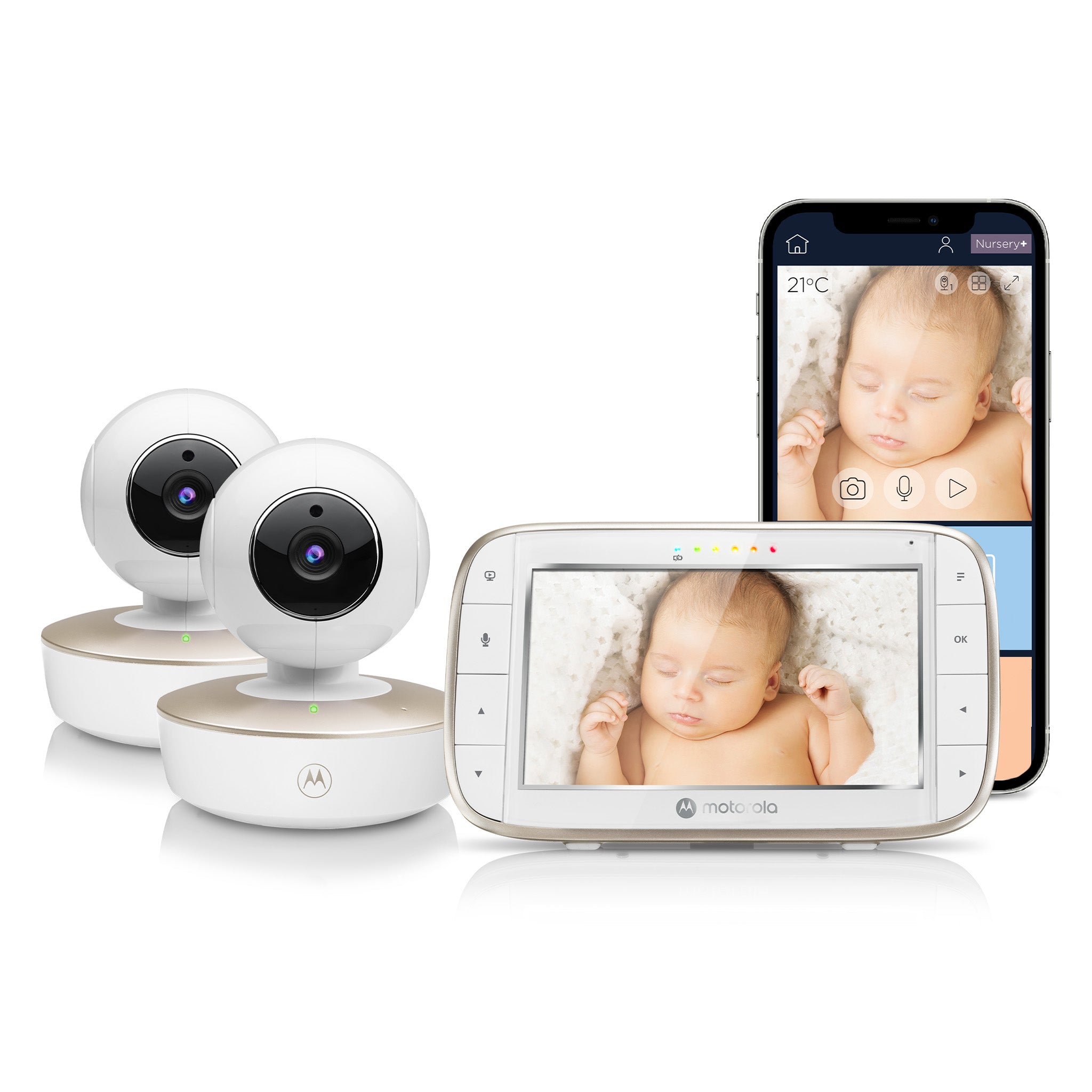
The Motorola Nursery VM855-2 CONNECT Twin Pack is not just the single-camera VM855 plus an unspecified spare. The exact U.S. store record names the two-camera Twin Pack and identifies SKU 810036771160; the manufacturer support entry calls it a two-camera set. The package is aimed at a household that expects two camera positions from the start and wants one dedicated parent screen rather than buying cameras separately and guessing about compatibility.
The parent unit is shared: Motorola lists a five-inch, 480 × 272 TFT display, and the manufacturer advertises split-screen viewing for both cameras. The V4 family guide explains that when more than one camera is paired, the split view can display several camera pictures; the viewer selects one camera for audio. That distinction is central to the Twin Pack. It is a sensible layout if seeing two rooms at once matters more than hearing two rooms at once. It is not a solution for a household whose essential requirement is simultaneous audio from both cameras.
Use the count that is actually in the box
The official package title and product image show two camera units beside one parent monitor. The broader VM855 system can pair with up to four camera positions, but that expansion ceiling does not mean the Twin includes four. Likewise, a separate additional-camera listing is an add-on accessory, not another complete monitor. If buying from a different seller or considering a used package, verify the exact VM855-2 name and the number of cameras, because an add-on or partial bundle can look similar in a family listing while leaving you without the right hardware.
Each VM855 camera has an internal rechargeable battery. Motorola rates it for up to three hours of backup away from the adapter, which is helpful for short repositioning or trying a different angle. With two units, you have two batteries and two charging/power decisions; the backup claim is not two-camera all-night cordless operation. The manual's first-use charging instruction is 16 hours. Plan where both supplied adapters can reach safely, and keep all cords out of the crib and more than three feet from the child.
Two different routes to a picture
At home, the dedicated parent monitor can receive a local camera feed without depending on Wi-Fi. The manufacturer advertises a 2.4 GHz FHSS maximum range of up to 1,000 feet; the manual says walls, metal, reinforced concrete and nearby electronics can weaken reception. With two rooms, the actual path matters twice. Test each camera location and the caregiver's normal route with the parent unit, and do not treat a maximum range claim as an in-home guarantee.
The phone route is optional but more involved. To use the Motorola Nursery app, a compatible smartphone or tablet joins the camera to a Wi-Fi router, and away-from-home viewing needs Internet access and an account. The V4 guide recommends at least 0.6 Mbps upload bandwidth per camera and lists Android 7.0 or later and iOS 10.0 or later; check current software support rather than assuming old compatibility still applies. The product page advertises app split-screen for up to four cameras and event notifications. The exact recording trigger, storage period and completeness are not defined in the reviewed material, so treat those as optional app conveniences rather than a promised record.
Camera movement and battery life should not be oversold
Each camera can be remotely panned and tilted from the parent unit, and the manufacturer lists 2× digital zoom. Infrared night vision shifts the picture to black and white when the room is dark. Two-way talk and five repeating sound choices are documented. The temperature reading and sound indicators can help a caregiver notice a change, but they are not medical instruments or substitutes for direct supervision.
The manual states up to five hours of parent-unit monitor operation on its built-in 2,000 mAh battery, while the camera has its own 1,200 mAh battery with up to three hours backup. These figures are manufacturer claims, not independent measurements, and the guide does not define continuous-screen test conditions. A power-saving setting can turn the picture off while audio remains on, which is a different operating plan. If a precise number of hours with both video pictures continuously on is essential, that condition remains unverified.
Is the Twin the right trade?
Choose VM855-2 when the second camera is a genuine need and simultaneous pictures are useful. It is more straightforward than buying one camera now and later verifying the fit and stock of a separate camera, but the second room still adds charging, placement and signal checks. For one nursery, the one-camera VM855 CONNECT keeps the same family screen and app options with less hardware. For families that need both room sounds at once, look for a system whose manual explicitly documents dual-audio operation; VM855 split-screen alone does not satisfy that requirement.
Make the local screen work before setting up the app, then test both camera links and the second-room audio selection. Follow the model-specific cord, battery and mount guidance. A monitor can make check-ins easier; it does not replace a caregiver's responsibility to supervise.
Key details at a glance
| Parent-unit screen | 5 in |
|---|---|
| Published display resolution | 5-inch TFT LCD, 480 x 272 pixels. The manufacturer’s 720p claim describes the app video route, not this parent screen. |
| Camera-to-parent-unit connection | A dedicated parent display receives a local monitor feed; Wi-Fi and the Motorola Nursery app are an optional, separate route for viewing on a phone or tablet away from home. |
| Advertised maximum range claim | 1000 ft |
| Cameras in the reviewed kit | 2 |
| Maximum camera units supported | 4 |
| Video rooms visible at once | 2 |
| Phone viewing away from home | Yes |
| User-replaceable parent-unit battery | No |
| Supplied camera lens setup | Motorized remote pan and tilt; two-times digital zoom. |
| Recommended stable operation uses home Wi-Fi | No |
| Motion alert | No |
| Audio-only system | No |
| Parent talk-back | Yes |
| Room-temperature readout | Yes |
| Parent-unit batteries included | Yes |
| Preloaded lullaby count | 5 |
| Parent receivers included | 1 |
Use the exact model’s instructions for operating limits, supplied equipment and version differences.
Sources for this assessment
- Exact Motorola Nursery U.S. VM855-2 CONNECT Twin Pack listing
- Exact Motorola Nursery U.S. VM855-2 product record
- Motorola Nursery VM855-2 CONNECT support entry
- VM855 CONNECT User Guide V4 EN-EU&US
- Motorola Nursery VM855-2 CONNECT manufacturer product specification
- Exact U.S. VM855-2 CONNECT Twin Pack product image

Check the room and the receiving setup.
Read the exact model's constraints, camera count and supervision limits before choosing a package.