
Your needs, this model
Does it fit your priorities?
Will your phone be the display for a one-camera room, with Wi-Fi available at the camera location?
Motorola describes a single PIP1015 camera viewed through the Bebé phone app and says Wi-Fi is needed. The listing does not describe a separate parent screen.
Explore this need in the finder →Is one camera view enough, or must two nursery pictures be visible at once?
The exact U.S. listing is the one-camera PIP1015 configuration. Although it says more cameras can be added in the app, it does not document simultaneous two-room viewing.
Explore this need in the finder →Are phone-app motion notifications useful, or is a separate parent-unit motion alert essential?
Motorola lists motion notifications in the Bebé app, but the PIP1015 listing includes no dedicated parent unit. These are different alert paths.
Explore this need in the finder →Do you need a room-temperature reading on a dedicated parent unit, rather than an app alert?
The product page lists app alerts for temperature and humidity but no dedicated parent screen or live parent-unit reading. The required reading path is not established.
Explore this need in the finder →A camera that makes your phone the monitor
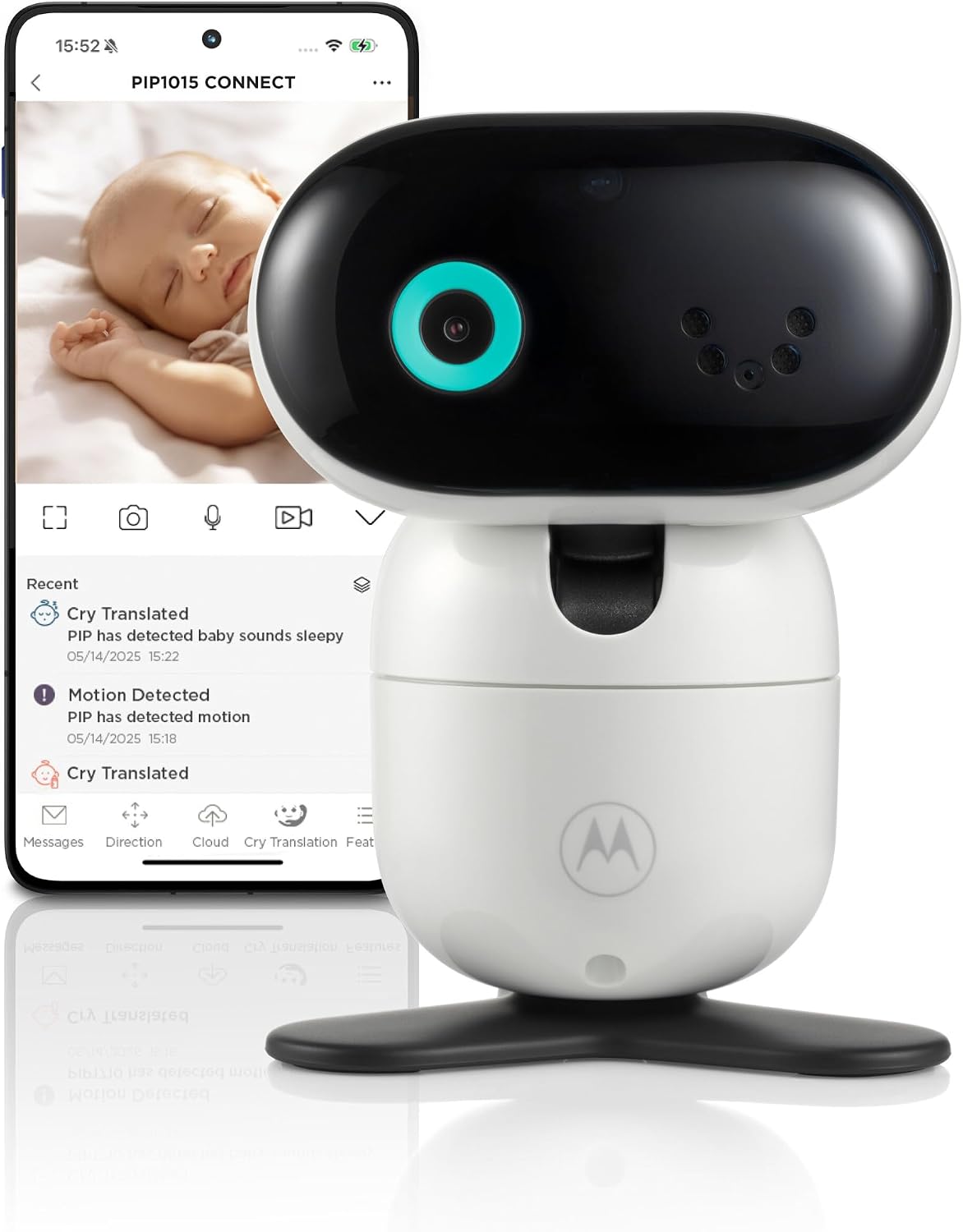
The Motorola PIP1015 CONNECT is a one-camera Wi-Fi setup built around phone viewing. The exact U.S. listing identifies the model as PIP1015 CONNECT, SKU 810036774314, and directs the user to Motorola’s Bebé app for the live picture and remote controls. Unlike a kit with a handheld receiver, the PIP1015 does not give you a separate screen to leave on the nightstand. Motorola’s page points shoppers who want a bedside screen toward the separate PIP1515 CONNECT. That difference matters more than the shared CONNECT name: here, the phone is the display.
That can suit a household that already keeps a phone nearby and wants to check the nursery without carrying another receiver. Motorola lists 1080p live video in the app, remote pan, tilt and zoom, infrared night vision, and two-way talk. The app can also send alerts for cries, motion, sound, temperature and humidity. Those are manufacturer-listed capabilities, not a guarantee that an alert will arrive under every network or phone-setting condition. If you want a dedicated receiver that stays ready while your phone is charging, muted, or being used for something else, choose a model with a separate parent unit instead.
The routine depends on Wi-Fi and an app
Motorola says the camera needs Wi-Fi and presents phone viewing as the way to check in from anywhere. The practical setup is therefore not just “plug in a monitor”: the camera location must have a workable Wi-Fi connection, and a caregiver needs a compatible phone with the Bebé app. The product page does not state a Wi-Fi band, minimum upload speed, or a model-specific phone operating-system requirement. Check the current app compatibility and network needs for the phone you intend to use before buying, especially if the camera will sit at the edge of your router’s coverage.
The phone-only arrangement has a clear upside: there is no second parent display to keep charged, carry, or hand off. It also has a clear compromise. The published feature list describes Wi-Fi and app access, not an independent local camera-to-screen link. If you need a picture when the router is unavailable, or you want a monitor that can be checked without opening a phone, this page does not establish that the PIP1015 has a fallback path. A separate local-video monitor is a more suitable fit for that requirement.
Alerts are useful, but their limits still matter
For a parent who wants phone notifications, the listed mix is broader than a simple camera feed: cries, movement, sound, temperature and humidity appear in Motorola’s alert description. The product page does not publish alert thresholds, explain how the different alerts behave together, or promise that they replace an attentive adult. Temperature and humidity notifications are household prompts, not calibrated environmental or medical readings. Test the placement and the phone’s notification settings during a normal awake period rather than relying on an unverified setting overnight.
Motorola also lists BeyondCry cry translation as an optional plan in the Bebé app. Treat that as an add-on, not a condition for basic video, talk-back, or the alerts described on the product page. Families who are interested should read the current plan terms and decide whether they actually want that feature before paying for it. Cry interpretation is not a diagnosis or a substitute for responding to the child.
The listing says additional cameras can be added in the app, which may help if your household later wants another room. It does not specify the maximum camera count or confirm that two rooms can be watched and heard simultaneously. The U.S. box itself is the single-camera PIP1015 configuration; adding an optional camera is not the same as buying a reviewed twin pack. If simultaneous two-room coverage is essential, choose a package whose exact contents and viewing mode establish that arrangement.
Who should choose it—and who should not
Choose the PIP1015 CONNECT when a one-camera phone feed is acceptable, Wi-Fi reaches the camera location, and remote pan/tilt/zoom or app notifications are useful. Its 1080p statement is the manufacturer’s app-video claim, not an independent image test. The camera’s exact power arrangement, wireless range, app-service retention, notification thresholds and multi-camera limits are not specified on the U.S. product listing, so none should be treated as a guaranteed feature.
Skip it if a dedicated screen, a Wi-Fi-free in-home picture, or two simultaneous room views are must-haves. The Motorola PIP1610 HD CONNECT review describes a one-camera kit with both a local parent screen and an app path; it is a different configuration, not an expanded PIP1015 package. In the finder, the PIP1015 belongs with video systems that use phone access: requiring a separate screen should rule it out, while a one-room phone-viewing need can fit. A strict screen-size minimum, unknown continuous-runtime requirement, or essential two-room-at-once setup should not be waved through just because another camera can be added later.
Sources: Motorola Nursery’s U.S. PIP1015 CONNECT listing and its published product record. The exact listing is the basis for the camera, app, alerts and feature distinctions above.
Key details at a glance
| Camera-to-parent-unit connection | Single Wi-Fi video camera streamed to the Motorola Bebé phone app; no dedicated parent display or separate local radio-screen path is listed for this configuration. |
|---|---|
| Cameras in the reviewed kit | 1 |
| Video rooms visible at once | 1 |
| Phone viewing away from home | Yes |
| Supplied camera lens setup | One Wi-Fi camera with app-controlled pan, tilt and zoom and infrared night vision. |
| Recommended stable operation uses home Wi-Fi | Yes |
| Audio-only system | No |
| Parent talk-back | Yes |
Use the exact model’s instructions for operating limits, supplied equipment and version differences.
Sources for this assessment

Check the room and the receiving setup.
Read the exact model's constraints, camera count and supervision limits before choosing a package.