
Your needs, this model
Does it fit your priorities?
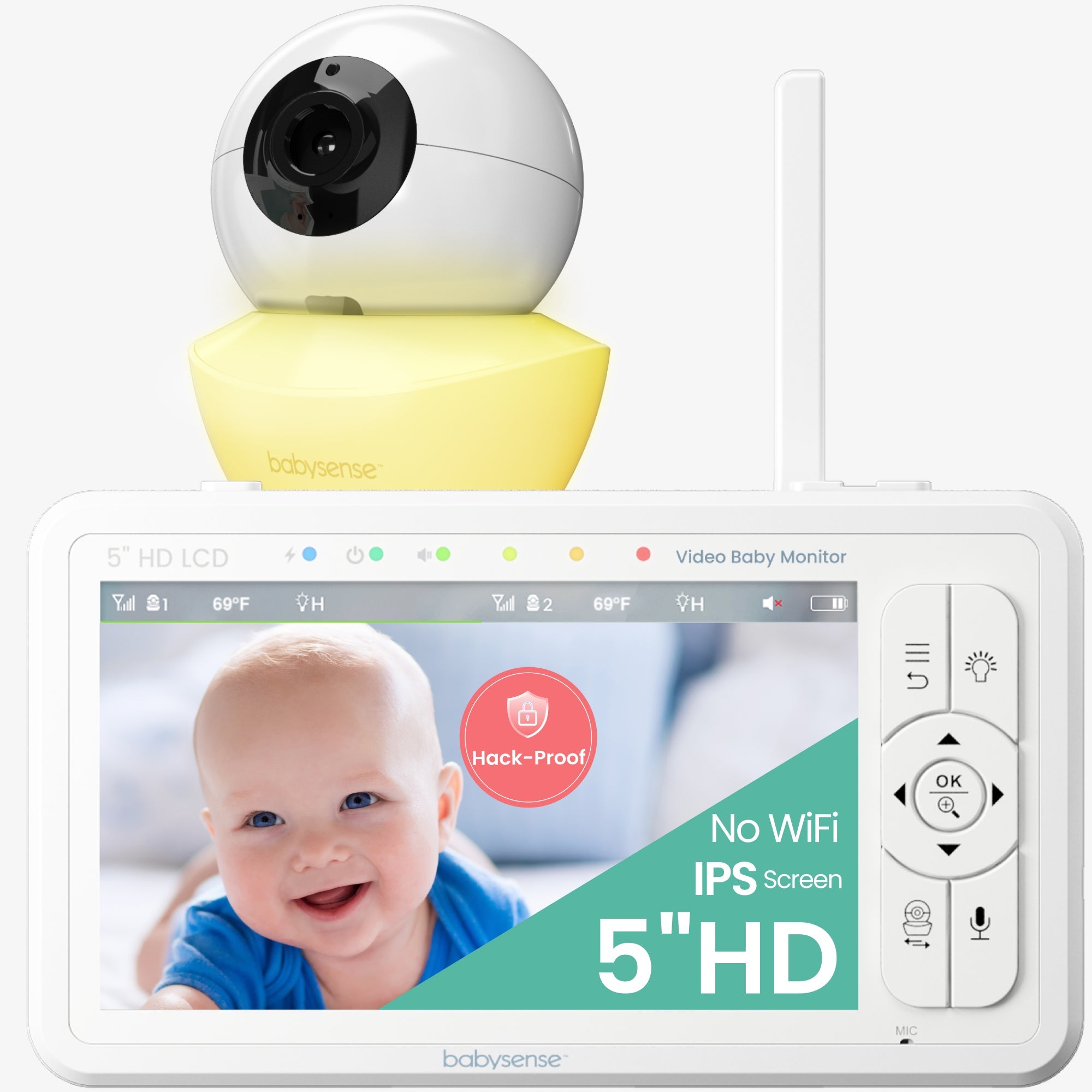
Does the HD S2 one-camera package fit a dedicated local five-inch HD picture for one room?
Yes. The exact page and shared HD S2 manual identify a five-inch 1280 × 720 viewer; the one-camera package provides a local parent receiver.
Explore this need in the finder →Can the single-camera box provide two camera pictures at the same time?
No. Its reviewed box contains one camera. A separate compatible camera would be additional equipment, not included in this configuration.
Explore this need in the finder →Is remote pan and tilt available without using a phone or Wi-Fi?
Yes. The current exact product page documents remote pan and tilt and the manual describes a dedicated parent unit; the camera link is local.
Explore this need in the finder →Does the manual guarantee a ten-hour minimum of screen-on battery use?
No. It says approximately up to 12 hours with the monitor on; an upper estimate is not a guaranteed minimum, so runtime stays unknown for essential-minimum matching.
Explore this need in the finder →A one-camera local monitor with a larger screen
The Babysense HD S2 one-camera package is a fit for a household that wants one room on a dedicated parent viewer, prefers a camera that can be redirected remotely, and does not want the camera feed routed through home Wi-Fi. Its main advantage over the small-screen local systems in this library is the five-inch 1280-by-720 display. The trade-off is not hidden in a feature list: this reviewed box contains one camera, so it cannot show two rooms at once unless another compatible camera is added later.
What is actually in the one-camera box
The current U.S. product page calls this the HD S2 one-camera monitor and specifies “HD S2 1CAM.” The official HD S2 manual identifies the two package versions as HD S2 – 1 Camera and HD S2 – 2 Cameras. For the one-camera version it lists one parent unit, one camera, two AC adapters, one wall-mount set and the guide. The separate two-camera package adds a second camera, another adapter and another wall-mount set. That difference matters because the HD S2 family can pair up to four cameras, but the capability to add cameras is not the same thing as having them in the starter box.
Large 720p screen; camera movement without a phone app
The manual calls the parent display a five-inch TFT LCD with 1280-by-720 pixels. The product artwork calls it IPS, which is not consistent with the manual and specification text; I would compare the published diagonal and resolution, not claim a particular panel technology. The camera supports remote pan and tilt and two-times or four-times digital zoom. The zoom enlarges the displayed view, not the camera’s optical detail, and the manual says zoom is unavailable in split-screen mode. With only one camera in this kit, that split limitation is not relevant until the system is expanded.
The parent unit and camera communicate locally over 2.4 GHz FHSS. There is no documented phone-away or internet viewing path, so this avoids router and app setup but also confines checking to the dedicated receiver’s radio link. The manual gives up to 960 feet in open space with no obstructions; the current product page advertises up to 1,000 feet. Those are nominal open-area claims, not a promise across a particular home. The manual warns that walls, metal and nearby 2.4 GHz devices can affect reception. Test the camera where it will actually stay rather than buying around the longest number.
Night light, sound activation and temperature prompts
The camera has infrared night vision, a remotely controlled three-level night light, talk-back, a temperature display and temperature alerts. The manual also describes five lullabies and white noise played from the camera. These are household conveniences, not health measurements or a substitute for checking the room. Sound-activated VOX is off by default. When enabled, the system stops sound and video transmission after 30 seconds without detected sound, then resumes when sound passes the chosen sensitivity threshold. This can be useful if you want the screen dark while the room is quiet, but it is sound-triggered viewing rather than a motion alert. The product materials do not establish a dedicated motion-detection alert.
Talk-back has a specific trade-off: the manual says you cannot hear the camera while holding the talk button. Temperature values also depend on placement; the guide warns that the sensor should be extended away from the camera body and placed where air circulates. Treat the value and alert as prompts, not precise room-control equipment.
Battery figures are useful when their mode is clear
The parent unit contains a built-in, non-removable 3.7-volt, 4,000-mAh rechargeable battery. The manual estimates up to 20 hours with VOX on and up to 12 hours with the monitor on, and says a full charge takes about eight hours. These are manufacturer estimates, not my measurements or guaranteed minimums; the manual does not supply a test protocol for room noise, screen brightness, battery age or radio conditions. If you need the picture continuously on for a defined shift, the “monitor on” figure is more relevant than the longer VOX figure, but I would still plan around the supplied adapter and recharge schedule rather than assume an exact runtime.
Choose the single kit only if its limits fit
Choose this package for one local camera, a five-inch HD parent screen, remote camera movement and a setup that does not need home Wi-Fi. Compare the separate HD S2 two-camera kit if you need two cameras in the box and want simultaneous split pictures; its audio remains focused on one camera rather than both rooms at once. If two rooms must be heard simultaneously as well as seen, compare the Infant Optics DXR-8 PRO SS, whose exact manual documents a selectable dual-audio split mode. For a smaller local screen with camera movement, read the VTech VM923 review, but note its 2.8-inch display.
Before installation, follow the HD S2 manual: keep the camera at least six feet from the crib, secure cords well out of reach, and never put a camera or parent unit in the crib or playpen. The guide says this indoor monitor cannot replace responsible adult supervision and is not a medical device.
Babysense HD S2 one-camera product page · Official HD S2 user manual
Key details at a glance
| Parent-unit screen | 5 in |
|---|---|
| Published display resolution | 5.0-inch TFT LCD, 1280 × 720 pixels per the exact shared manual and official specification field; package artwork calls it IPS, so panel technology remains discrepant. |
| Camera-to-parent-unit connection | Direct local 2.4 GHz FHSS radio link between the camera(s) and dedicated parent unit; no home Wi-Fi or internet viewing path documented. |
| Advertised maximum range claim | 1000 ft |
| Cameras in the reviewed kit | 1 |
| Maximum camera units supported | 4 |
| Video rooms visible at once | 1 |
| Phone viewing away from home | No |
| User-replaceable parent-unit battery | No |
| Supplied camera lens setup | Remote pan and tilt; digital 2× and 4× zoom. The manual says digital zoom is unavailable while split-screen is active. Exact pan/tilt travel degrees are not asserted. |
| Recommended stable operation uses home Wi-Fi | No |
| Audio-only system | No |
| Parent talk-back | Yes |
| Room-temperature readout | Yes |
| Camera-side mood light | Yes |
| Parent receivers included | 1 |
Use the exact model’s instructions for operating limits, supplied equipment and version differences.
Sources for this assessment
- Babysense current exact HD S2 product page; one-camera listing
- Official Babysense HD S2 user manual covering HD S2 – 1 Camera and HD S2 – 2 Cameras
- Babysense official HD S2 one-camera package marketing rendering
- CPSC exact-string recall API query for Babysense HD S2; empty response does not establish comprehensive clearance

Check the room and the receiving setup.
Read the exact model's constraints, camera count and supervision limits before choosing a package.