
Your needs, this model
Does it fit your priorities?
For an existing SCD860/27 owner, is one Internet-connected phone/tablet camera feed the intended setup, and can the current app be installed in this country?
The exact Philips product describes a phone/tablet app path, while Philips' SCD860/27 support FAQ says Baby Monitor+ replaced uGrow and availability varies by country. Confirm the app on the owner's device before relying on this discontinued camera; it is not a purchase result.
Explore this need in the finder →Must the monitor keep showing a local image when Wi-Fi or Internet is unavailable?
No local dedicated Parent Unit path is listed for SCD860/27; both camera and app need Internet for the documented phone view. An essential offline need requires a documented local-radio receiver instead.
Explore this need in the finder →Must two room videos be visible simultaneously rather than merely pairing several cameras?
The SCD860 manual says the app can connect multiple monitors but only displays video from one at a time. It does not meet an essential two-room picture need.
Explore this need in the finder →Do you require a camera that turns remotely, rather than an app that pans within a zoomed image?
SCD860 documents app zoom/pan and fixed focus, not motorized pan/tilt. Require an exact manual showing remote camera movement if the camera itself must turn.
Explore this need in the finder →Would the camera itself need to continue running if mains power is lost?
SCD860's manual documents adapter-powered operation and no camera battery backup. A phone or app cannot power the Baby Unit.
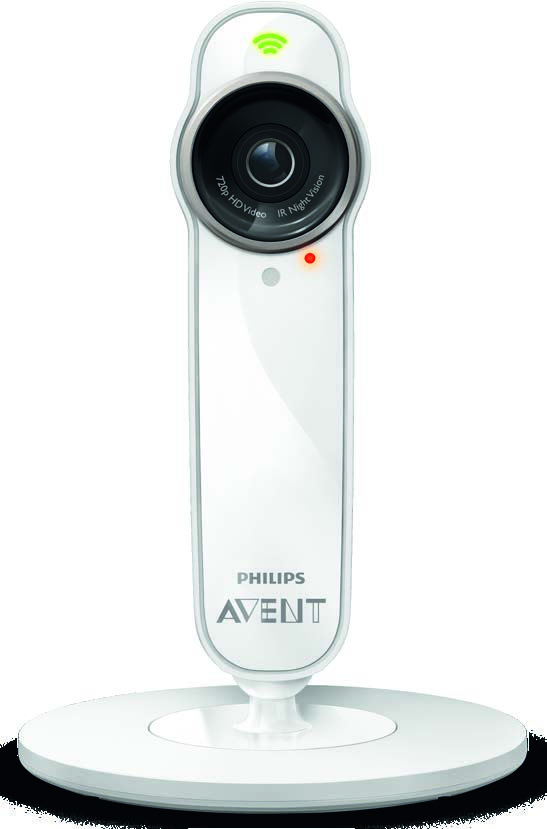
Explore this need in the finder →The Philips Avent SCD860/27 is a discontinued, phone-only Wi-Fi camera, not a local monitor with its own parent screen. It can send a live feed through the Baby Monitor+ app, but the camera needs a 2.4 GHz Wi-Fi connection and both camera and phone need internet access. For an owner deciding whether an existing unit still fits the household, the app change is as important as the camera: Philips replaced uGrow with Baby Monitor+ in 2022 and says old uGrow accounts and data were deleted in 2023. This is an owner reference, not a recommendation to buy a used set.
The phone is the receiver
Unlike Philips Avent's local video products with a handheld Parent Unit, SCD860/27 sends sound and video to a smartphone or tablet. It can be convenient if the person checking in is already using a phone and needs the option to view from outside the home. The tradeoff is that there is no separate screen waiting on a table or nightstand: the phone needs to be charged, connected, and running a supported app. The exact product information says the monitor and app both need internet. A good nursery Wi-Fi signal alone is not enough if the internet or the phone's connection is unavailable.
The camera uses 2.4 GHz Wi-Fi, not 5 GHz. During setup Philips tells owners to put the phone and camera on the same network and start near the router; this is a compatibility requirement, not a promise about range through a house. Philips lists video up to 720p, color by day and infrared black-and-white night vision. Its manual also says the app can reduce quality when network bandwidth falls.
How the old app changed—and what a secondhand owner should do
The camera originally used the uGrow Smart Baby Monitor app. Philips says Baby Monitor+ replaced uGrow on October 1, 2022. The official migration instructions call for a new account, a factory reset of the camera, and pairing it again in the new app; the two apps cannot be paired to the same camera at the same time. Philips also says that all uGrow accounts and data were deleted as of 2023. That matters if a used camera is still associated with a former owner's profile: use the manufacturer's reset and invitation/access controls rather than assuming the seller's sign-in will transfer.
App compatibility is a moving target on discontinued hardware. Philips' SCD860/27-specific availability FAQ lists iOS 11 or later and Android 5 or later, and warns that Baby Monitor+ is not available in every country. Check the app listing and Philips support for the phone, country and current release you actually plan to use. Those minimums are not a guarantee that every modern or older handset will pair, nor that an app listing in one region establishes service everywhere.
One camera can serve a shared routine, not a four-screen nursery wall
Philips describes up to ten cameras, ten total accounts and three simultaneous viewers per camera. These are separate limits: the exact user manual says the app can display video from only one monitor at a time, though it can send notifications from others. For one SCD860 camera in the documented plan, plan on one live room picture; the inspected U.S. page/manual do not establish the camera count in any retail or used package. A household that must see two nurseries simultaneously should choose an exact kit whose manual documents split-screen viewing.
The app provides talk-back, a multicolor nightlight and ten lullabies. A sensor unit measures room temperature and humidity, with configurable notifications. Sound notices use a level threshold and preset duration, not a documented cry-classification system. Background monitoring is available, but the manual warns that during a phone or VoIP call you may not hear continuous audio and may receive a cry notification instead. If an always-audible bedside feed is essential, that changes the match.
Fixed camera, app reframing, and mains power
The camera has fixed focus and the specification lists digital zoom and pan in the app. The parent turns or places the camera itself when positioning it; the manual does not describe a motor that remotely sweeps the room. Digital panning moves around an enlarged image—it cannot follow a child by turning the camera. If remote mechanical pan and tilt are must-haves, choose a model whose manual explicitly documents them.
SCD860/27 uses the supplied AC adapter; the documents do not list camera battery backup. If continued camera operation during a power failure is essential, do not infer it from a rechargeable phone. Temperature and humidity readings are household information, not medical or safe-sleep alerts. Keep the unit outside the crib, use the specified adapter, and follow the manual's cord warning: keep the cable more than 3.5 feet (1 meter) from a child. A monitor does not replace adult supervision.
Who should keep it, and what to compare instead
This page is useful for a family that already owns an SCD860/27 and is checking the exact network, app migration, viewer and power limits. Philips marks it discontinued, so there is no current-buying recommendation here. If you want an independent local screen without a router, compare the VTech VM819; if you want to keep app viewing in an earlier phone-only system, the separately reviewed Motorola PIP1010 CONNECT is a more direct operating-plan comparison, though it too is an earlier model. For two rooms at once, compare kits such as Infant Optics DXR-8 PRO SS only after confirming that split picture and audio behavior meet your needs. The right answer changes when your must-have is a separate screen, two-room display, motorized movement or backup power—not just the word “Wi-Fi.”
Philips SCD860 support is the starting point for model-specific setup and safety documents. The uGrow migration instructions and app availability guidance are especially relevant before reconnecting an existing camera.
Key details at a glance
| Camera-to-parent-unit connection | Single camera to Philips Avent app through a 2.4 GHz router and Internet; the exact page/manual do not list a dedicated local Parent Unit path. |
|---|---|
| Maximum camera units supported | 10 |
| Video rooms visible at once | 1 |
| Phone viewing away from home | Yes |
| Supplied camera lens setup | One fixed-focus camera. Philips lists app-based digital zoom and panning; the manual's panning moves within an enlarged image. Physical placement/angle is adjusted by hand; remote motorized pan/tilt is not documented. |
| Recommended stable operation uses home Wi-Fi | Yes |
| Audio-only system | No |
| Parent talk-back | Yes |
| Room-temperature readout | Yes |
| Camera-side mood light | Yes |
| Preloaded lullaby count | 10 |
| Included crib-mount option | No |
| Supplied camera mount | Standing foot and included wall-mount bracket |
| Parent receivers included | 0 |
Use the exact model’s instructions for operating limits, supplied equipment and version differences.
Sources for this assessment
- Philips U.S. All Series baby-monitor catalogue, page 2
- Philips U.S. Avent Smart baby monitor SCD860/27 product page
- Philips U.S. support page for SCD860/27
- Philips Canada exact SCD860/27 support documentation list
- Philips SCD860 multilingual user manual, English section
- Philips SCD860 Important Information manual linked from the exact U.S. support route
- Philips FAQ: migration from uGrow to Baby Monitor+; applies to SCD860/27
- Philips app availability and operating-system FAQ for SCD860/27
- Philips 2.4 GHz/internet pairing FAQ for SCD860/27
- Philips SCD860 nightlight operation FAQ
- Philips SCD860 sound-mute FAQ
- Philips SCD860 camera image embedded in the exact-model user manual
Check the room and the receiving setup.
Read the exact model's constraints, camera count and supervision limits before choosing a package.