
On this page
Your needs, this model
Does it fit your priorities?
Do you require a camera picture or sound from the nursery?
No. Smart Sock 3 is a wearable sensor/phone reading system with a Base Station, not a room camera, video feed or baby-audio monitor.
Explore this need in the finder →Do you need a network-independent plan?
The guide describes a local Base Station notification path, but phone readings/remote access require 2.4-GHz Wi-Fi. The local plan provides no video or nursery audio.
Explore this need in the finder →Is an audio-only room feed essential?
No. Smart Sock 3 provides sensor readings and Base Station/app alerts, not a nursery audio feed.
Explore this need in the finder →Would talk-back from a parent unit be useful?
No. This wearable system has no parent talk-back feature.
Explore this need in the finder →A wearable sensor, not a camera monitor
Owlet’s device-identification guide distinguishes Smart Sock 3 from Dream Sock by its uncovered sensor and compatibility with the Owlet Care app. The Smart Sock 3 guide describes a foot-worn sensor and nearby Base Station; it does not include a room camera, live video, a parent display or a baby-room audio feed. That makes it the wrong answer if the ordinary monitor need is to see or hear the nursery. It is a different kind of product, focused on readings from a sensor worn on the child.
The user guide says the sensor uses pulse oximetry and sends information to the Base Station, which provides its own light and sound notifications. Wi-Fi is used for the app route: remote readings require a 2.4-GHz connection, while the guide also describes a local-network mode when the phone and Base Station share Wi-Fi and the app remains open. The Base Station is identified as the primary notification device. Those are separate operating paths; an app outage can remove remote information without changing what the guide says about the nearby Base Station. This is not a video monitor or a guarantee of continuous data under every condition.
Fit and charging are part of everyday use
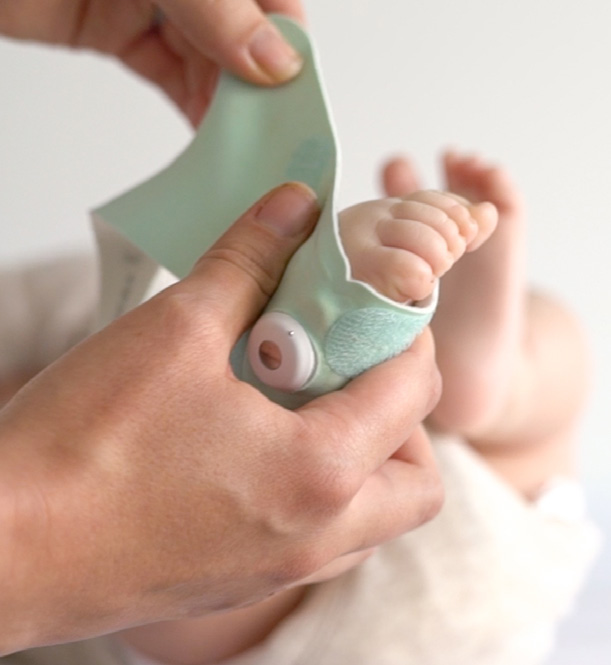
The English guide covers both Smart Sock 3 and Smart Sock Plus. Its standard Smart Sock sizing instructions describe two sizes, with a right and left sock for each; size 1 is for babies up to 12 pounds and size 2 for 12–30 pounds. The larger size 3 is for Smart Sock Plus, not the standard Smart Sock 3. Do not assume that an unlabelled used bundle contains the Plus sizes or any particular color. The instructions show the sensor attached to the fabric sock and positioned on the outside of the foot near the little toe. The fit should be snug, not tight, and Owlet advises switching feet regularly. The fabric sock and sensor also need the cleaning and drying routine in the manual.
The sensor charges at the Base Station when it is not being worn. That creates a repeated task: check its charge, make sure the Base Station is powered and in audible range, and confirm the app and network are available if phone readings matter. Placement or contact issues can produce yellow notifications; range, signal or battery issues can produce blue ones. The guide also describes red thresholds, but it explicitly says the product is not a medical device and is not intended to diagnose or replace a medical monitor. Do not use its app, alerts or marketing language as a substitute for medical advice, safe-sleep practice or direct supervision.
Owlet’s Smart Sock 3 FAQ lists up to 16 hours of sensor battery life, a manufacturer claim rather than a runtime test here. Return the sensor to the Base Station to charge between sleep periods, and do not assume an older used sensor will deliver the quoted runtime. The same FAQ says the Base Station is designed to notify if home Wi-Fi or phone service is unavailable, while app live readings are not available in that situation; the local alert and app-data plans should not be confused.
What changes with your monitor choice
If you require video, two-way room talk or a separate parent screen, this product cannot meet that need: the sensor’s app readings are not a camera stream. If your need is network-independent video, the Sock’s Base Station plan still does not provide a room picture. If the household specifically wants wearable readings and accepts the fit, charging, app and health-claim limits, read the full guide and consider only a verified current product configuration. Owlet’s current Dream Sock is a separate generation with the Dream app; do not assume its package, app or U.S. claims apply to Smart Sock 3.
This page is a reference for an exact manufacturer-named model, not a current purchase recommendation. Owlet’s support guide still identifies Smart Sock 3, but the current U.S. SKU, retail package and availability were not established in the inspected current catalogue. The manufacturer’s guide is titled for Smart Sock 3 and Smart Sock Plus together, and the image shown here is its fit photograph—not evidence of a particular finish or retail box.
References and model boundary
Use Owlet’s device-identification guide and the Smart Sock User Guide for the Care app distinction, sizing, placement, charging and safety limits. The guide covers Smart Sock 3 and Smart Sock Plus; the two generations are not interchangeable labels. The current monitor collection does not establish a current Smart Sock 3 SKU or retail offer. This review stays out of the buying shortlist while the exact current U.S. offer remains unverified.
Key details at a glance
| Phone viewing away from home | No |
|---|---|
| Audio-only system | No |
| Wearable sensor included in exact kit | Yes |
Use the exact model’s instructions for operating limits, supplied equipment and version differences.
Sources for this assessment
Check the room and the receiving setup.
Read the exact model's constraints, camera count and supervision limits before choosing a package.