
On this page
Your needs, this model
Does it fit your priorities?
Can Cam 2 work as a network-independent video monitor or on a 5-GHz-only camera connection?
No. The manual says Cam 2 connects only via 2.4-GHz Wi-Fi and the app live view is network dependent.
Explore this need in the finder →Do you need a dedicated parent screen?
The guide’s listed box includes the camera and app setup, not a parent-unit display.
Explore this need in the finder →Must the camera pan and tilt remotely?
No. Cam 2 is manually aimed; digital zoom does not steer it.
Explore this need in the finder →Do you need a temperature reading from the cable sensor?
Owlet documents the Cam 2 temperature/humidity sensor on its cable; its location can affect readings.
Explore this need in the finder →Camera V2 is Owlet Cam 2, not Cam 1
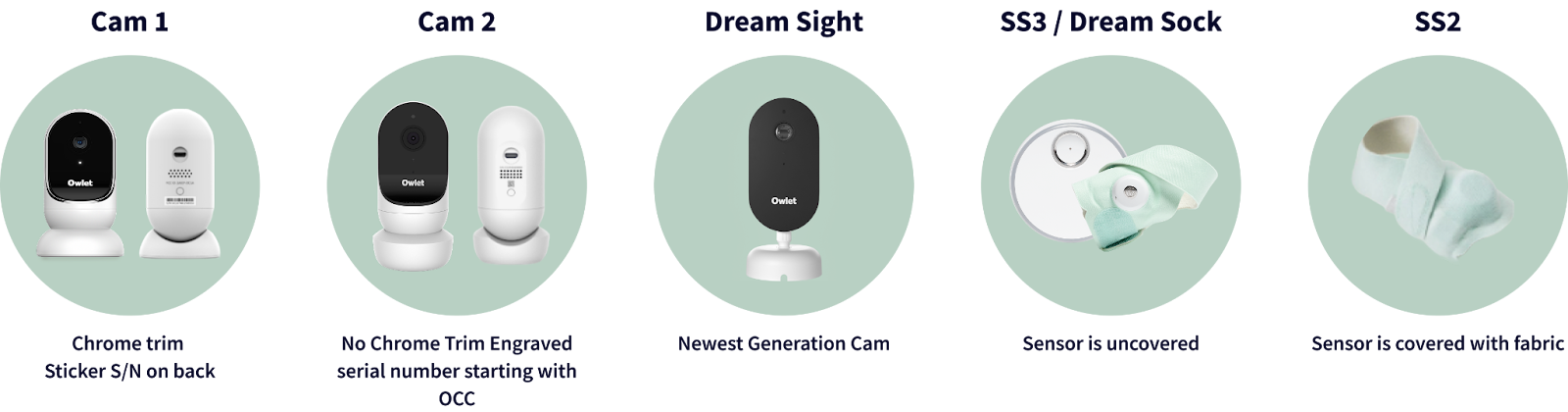
Owlet’s device-identification chart shows the Cam 2 generation in the column labeled Camera V2. It distinguishes that version by the lack of chrome trim and an engraved serial beginning with OC; Cam 1/Camera V1 instead has chrome trim and a sticker serial on the back. The official Cam 2 User Guide Rev. 8 gives a practical reference for owners. It does not establish a current U.S. retail SKU or present-day offer, so this exact generation is kept here for identification and comparison rather than a buying shortlist.
Plan around Wi-Fi and the Owlet app
The manual describes a camera that streams to iOS or Android devices through the Owlet app. It says Cam 2 connects on 2.4-GHz Wi-Fi and does not support 5 GHz; the manufacturer’s setup guidance asks the phone and camera to use the same network during pairing. This is not a stand-alone local-screen monitor. Live video and app features depend on the camera’s internet connection, so a lost connection means the room picture is not available in the same way as a direct camera-to-parent-unit system. The guide allows up to four devices to stream at once, but that is a device count, not a promise of four independent camera views.
Cam 2 adds more app tools than a basic live picture: the guide describes two-way talk, four-times on-screen zoom, background audio and video clips triggered by sound, motion or crying. The manufacturer says clip retention varies with the account’s subscription; check the live app terms rather than assuming a particular storage period. Notification sensitivity and the interval between alerts are adjustable. These are convenience features, not guaranteed detection: sound, movement or crying alerts can be missed, delayed or triggered by activity that is not important to the caregiver. They should not replace routine checks.
Temperature and humidity readings depend on cable placement
The Rev. 8 box list includes the Cam 2, a powered cable with room-temperature and humidity sensing, a magnetic base, a power adapter and a wall-mount kit with cable guards. Owlet’s support guidance says the sensor sits in the cable, so keep that section in the same ambient air as the child and away from a vent or other heat/cold source. Owlet also notes that converting its Celsius reading to Fahrenheit can produce an average difference of one to three degrees. Treat the values as room-comfort prompts, not precision climate measurements.
For installation, the manual allows a flat surface with the camera tilted by hand or a wall-mounted, bird’s-eye view. It instructs owners to keep the camera and cables 36 inches from the crib edge and to cover cables that run closer. The cable guards are a substantive part of the setup, not decorative extras. This is a mains-powered camera; the phone and camera connection do not provide backup video if the room loses power or internet.
Who should keep this reference
Cam 2 may make sense to an existing owner who wants app-based live video, background audio, adjustable event alerts and room-comfort readings, and who has a suitable 2.4-GHz network. It is a poor fit if a dedicated parent display, offline camera operation or a current verified U.S. purchase listing is essential. The manufacturer’s support chart and manual distinguish Cam 2 from Cam 1, but they do not establish an exact retail bundle or current stock. If you are shopping now, compare a currently verified model such as Owlet Dream Sight as a separate generation; do not assume its app compatibility, picture specification or included hardware matches Cam 2. For an offline screen, choose a reviewed local-radio monitor instead.
Read Owlet’s device-identification guide, Cam 2 User Guide Rev. 8 and Cam 2 Wi-Fi guidance, notification guidance, and the temperature/humidity sensor notes before changing an existing setup. The current monitor collection does not establish a current V2 SKU. This is an owner reference; the camera remains out of purchase results while its exact current U.S. offer is unverified.
Key details at a glance
| Camera-to-parent-unit connection | Owlet app over 2.4-GHz Wi-Fi; guide says camera does not support 5 GHz. |
|---|---|
| Cameras in the reviewed kit | 1 |
| Video rooms visible at once | 1 |
| Phone viewing away from home | Yes |
| Recommended stable operation uses home Wi-Fi | Yes |
| Motion alert | Yes |
More specifications and setup details
| Audio-only system | No |
|---|---|
| Parent talk-back | Yes |
| Room-temperature readout | Yes |
| Parent receivers included | 0 |
Use the exact model’s instructions for operating limits, supplied equipment and version differences.
Sources for this assessment
- Owlet Help Center: Which Device Do I Have?
- Owlet Help Center: Which Device Do I Have? — comparison graphic
- Owlet Cam 2 User Guide Rev. 8
- Owlet Cam 2 WiFi Essentials
- Owlet Cam 2 Notifications
- Owlet Cam 2 temperature and humidity sensor
- Owlet official U.S. monitor collection
- Owlet official U.S. all-products snapshot
Check the room and the receiving setup.
Read the exact model's constraints, camera count and supervision limits before choosing a package.