
On this page
Your needs, this model
Does it fit your priorities?
Do you require a separate screen and a camera picture without home Wi-Fi?
No. Cam 1 uses an app/Wi-Fi stream; Owlet says internet loss disables the live video feed. The manual does not list a parent display in the box.
Explore this need in the finder →Do you require remote camera pan and tilt?
No. Owlet says the Cam has no motor; the magnetic base is adjusted manually and app zoom is digital.
Explore this need in the finder →Would two-way talk through the camera help?
Yes. Owlet documents app two-way audio for Cam 1.
Explore this need in the finder →Do you need a temperature reading from the camera cable?
Owlet describes a temperature sensor on the power cable; its position affects the reading.
Explore this need in the finder →Identify the camera before comparing it
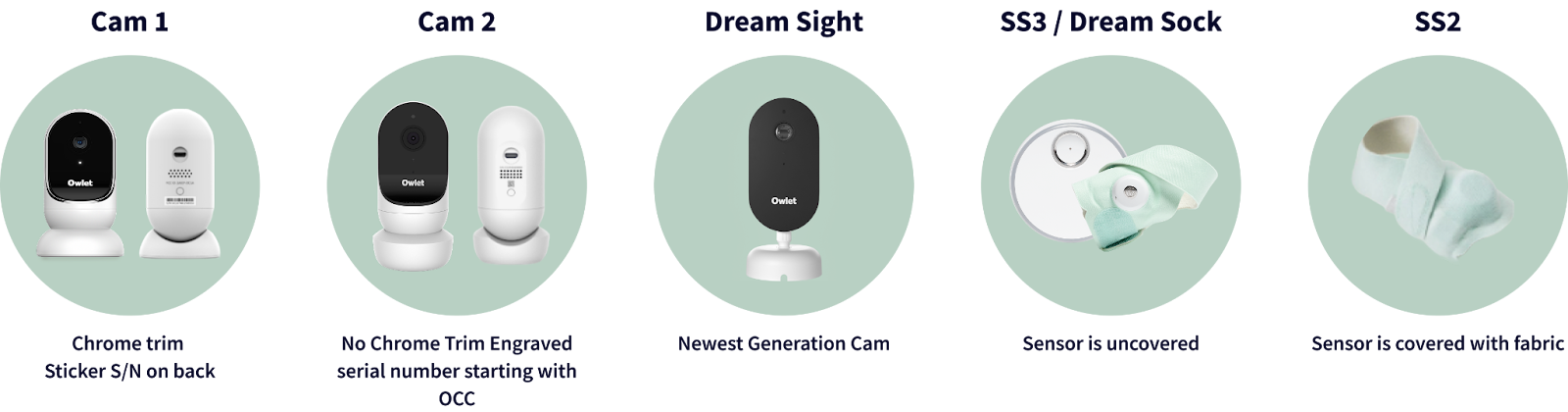
Owlet’s current device-identification chart labels this generation Camera V1 and places it alongside the older “Cam 1” name. The distinguishing cues are chrome trim and a serial-number sticker on the rear. Those details help an existing owner separate it from Camera V2, which has no chrome trim and an engraved serial beginning with OC. This is a reference for the exact camera generation, not a verified retail box: the manufacturer pages inspected here do not establish a current U.S. SKU or offer, so this is not a purchase recommendation.
A phone-streaming camera, not a parent-screen kit
Owlet’s Cam 1 product details describe 1080p HD video, a 130-degree field of view and two-way audio through the Owlet app. The camera and its installation guide do not document a separate parent monitor in the package. Video is therefore an app-and-network plan: if you want a dedicated screen that works without home Wi-Fi, this is the wrong type of system. Owlet says that an internet outage disables the app’s live video feed. The guide also describes background audio while the phone screen is locked, but that does not turn the camera into an independent local audio receiver.
The camera is mains powered. Its magnetic base lets you place it on a flat surface and adjust the angle by hand, or use the wall-mount parts for a higher view. Owlet’s support details say there is no motor for remote pan or tilt; the app’s four-times pinch zoom enlarges the image digitally rather than moving the camera. That distinction matters if the crib position changes: a caregiver has to adjust the physical angle at the unit. Test the view from the phone you actually use and the nursery’s real Wi-Fi locations instead of assuming an advertised field of view will include every corner.
Placement is part of the decision
The installation guide lists the camera, magnetic base, mounting plate, power cable with a temperature sensor, adapters, wall-mount parts and cable guards. It says to place the camera and cables at least three feet from the crib edge, and to cover any cable that must run closer. Follow the current guide’s instructions for the exact mounting arrangement; the manual warns that a damaged or exposed cord covering is a reason to stop using it. Owlet locates the temperature sensor on the power cable, so the reading corresponds to where that cable sensor sits, not a separate instrument placed anywhere in the room. It is a household reference, not a substitute for checking the environment directly.
This can suit an existing owner who wants phone video, app audio and a manually aimed camera, and who is comfortable with a powered, network-dependent setup. It is a poor match for families who need a local parent display, a network-independent camera picture, battery operation or remote camera movement. If you are choosing a new system, compare a currently verified camera configuration rather than treating the support page as proof that this older version is still sold. The current Owlet Dream Sight is a separate generation with its own app and feature set; do not assume the two models share setup or package details.
References and model boundary
The Owlet device-identification guide supplies the Camera V1/Cam 1 name and visual cues. The Cam 1 installation guide covers mounting and cable placement; Owlet’s Cam 1 product details document the image, audio, power and app behavior; its Wi-Fi guidance explains pairing. The current monitor collection does not establish a current V1 SKU or offer, so current availability remains unknown. Use the source materials to identify an existing unit, and do not treat this review as a promise of compatibility with a different Cam generation.
Key details at a glance
| Camera-to-parent-unit connection | Owlet app over Wi-Fi; the camera guide describes app video/audio and the support article documents network dependence. |
|---|---|
| Cameras in the reviewed kit | 1 |
| Video rooms visible at once | 1 |
| Phone viewing away from home | Yes |
| Recommended stable operation uses home Wi-Fi | Yes |
| Audio-only system | No |
More specifications and setup details
| Parent talk-back | Yes |
|---|---|
| Room-temperature readout | Yes |
| Parent receivers included | 0 |
Use the exact model’s instructions for operating limits, supplied equipment and version differences.
Sources for this assessment
- Owlet Help Center: Which Device Do I Have?
- Owlet Help Center: Which Device Do I Have? — comparison graphic
- Owlet Cam 1 Installation Guide — all languages, English section
- Owlet Cam 1 Product Details
- Owlet Cam 1 WiFi Essentials
- Owlet official U.S. monitor collection
- Owlet official U.S. all-products snapshot
Check the room and the receiving setup.
Read the exact model's constraints, camera count and supervision limits before choosing a package.