
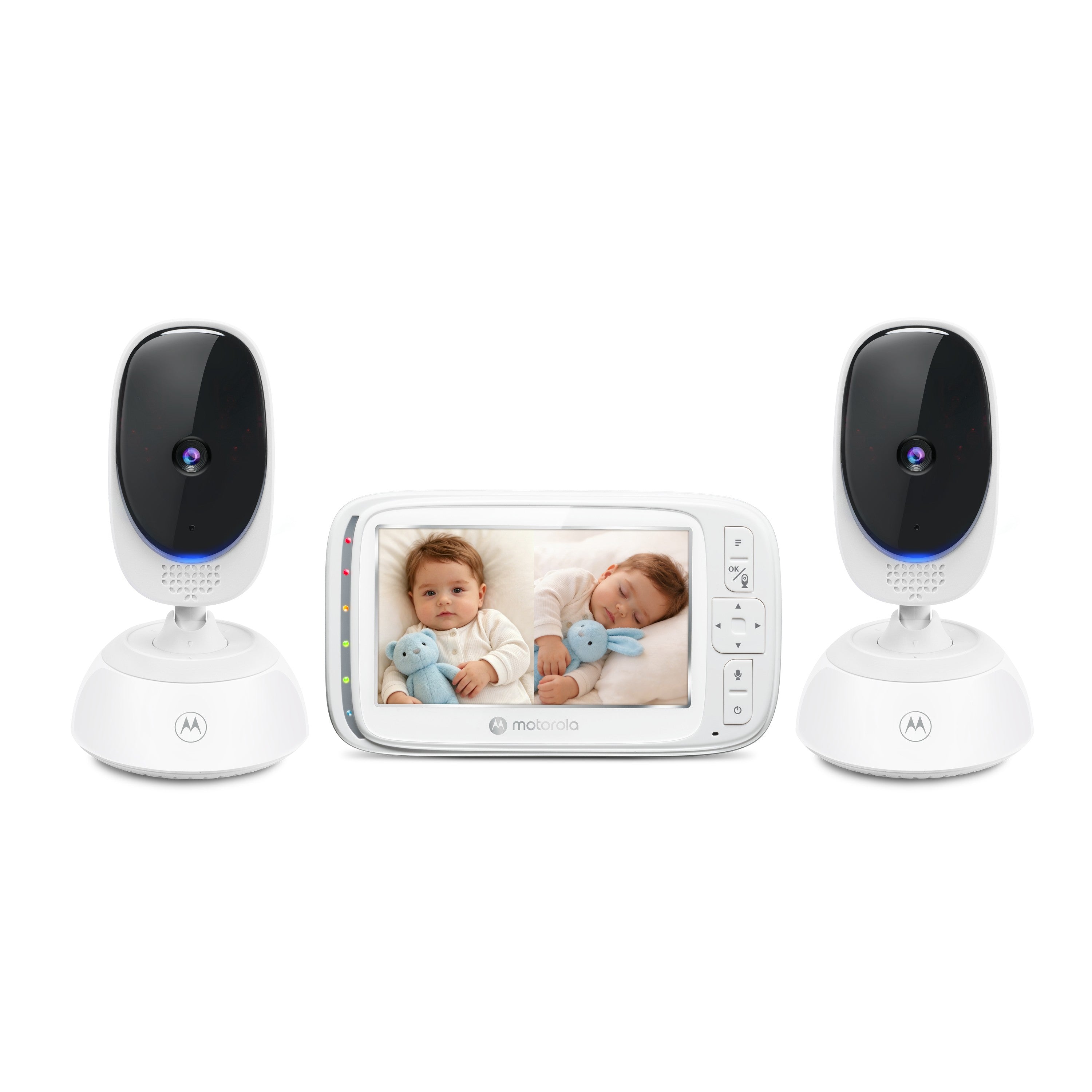
Your needs, this model
Does it fit your priorities?
Must two rooms appear as live pictures on the same screen?
The exact VM75-2 listing describes two included cameras and split-screen capability. Audio behavior in split mode is not confirmed.
Explore this need in the finder →Do you need to hear both rooms at the same time as seeing them?
The guide establishes split pictures but does not specify whether split mode carries one or two audio feeds; unknown does not satisfy this need.
Explore this need in the finder →Would a one-room view from either included camera be enough for some checks?
The guide documents selecting a particular camera; one selected feed uses one camera view and audio.
Explore this need in the finder →Who the VM75-2 Twin Camera set suits
The Motorola Nursery VM75-2 is the two-camera configuration of the VM75 local video-monitor family. Its separate U.S. shop listing identifies two cameras and one five-inch parent unit, and the exact product record names the VM75-2. Motorola’s support page also names VM75-2 and links the same VM75-family guide. The Twin set is for a household that wants two room pictures on one local monitor without depending on home Wi-Fi. It is not a phone-first system, and the additional VM75 camera accessory is not needed to create this exact package identity.
Motorola’s exact retailer page displayed Sold Out on October 23, 2026, while its product-record availability field returned a conflicting available flag. Keep the dated visible page status and inventory inconsistency in mind rather than treating either source as a forecast. The model remains a required review; verify whether the exact kit is actually available before buying.
Two pictures do not answer every two-room need
The useful difference from the standard VM75 is the package: this set includes two cameras, not one. Motorola describes split-screen capability, and its linked guide says that a parent unit can pair up to four cameras, select a particular camera, scan camera views one after another, and use split-mode viewing. The manual’s scan option changes views at about 20-second intervals. A four-camera pairing ceiling is not four cameras in the box; the VM75-2 listing establishes two included units.
Do not interpret two visible pictures as proof that both rooms remain audible simultaneously. The guide explains selection and sequential scanning, but does not clearly document the split-view audio behavior for this exact Twin package. Motorola’s current listing mentions two-way audio, which establishes talk-back/audio use but not the number of room feeds heard at the same moment in split mode. If you need two simultaneous audio feeds, this model does not meet that hard condition on the evidence available. If both pictures matter but one room’s sound at a time is acceptable, use the split picture only after checking how your exact receiver behaves and follow its manual; do not rely on a generic “two cameras” headline to settle the audio question.
Both camera heads support remote pan and digital tilt from the parent unit, and the family guide documents 1×/2× digital zoom. That can help adjust a safely placed view as you monitor different parts of the room. A digital crop is not a higher-resolution sensor. The named VM75 product page specifies a five-inch screen; Motorola’s feature page for the VM75 model label lists 480 × 272 pixels. The current retailer listing does not itself state the pixel count, so confirm the exact display specification if resolution is decisive.
Room, radio and power planning
This is a direct FHSS camera-to-parent-screen system, not an app camera. It needs no Wi-Fi for its local screen and has no documented away-from-home phone path. The store advertises a maximum range of up to 1,000 feet, but no numeric open-space test conditions are established in the linked guide. Motorola warns that walls, metal and other electronics can reduce reception; check the link in the locations you will use rather than expecting the headline distance through a house.
Both camera units need their supplied adapters and a safe outlet location. The North American guide warns that camera power cords must stay more than three feet away from the child, outside the crib and out of reach; use supplied adapters and no extension cord. The parent receiver has a built-in lithium-ion battery that the guide calls non-user-accessible. For longer monitoring periods, the guide recommends leaving it connected to power.
Published battery duration is not dependable enough to compare as a continuous screen-on guarantee. The current shop copy advertises up to 17 hours for the parent unit; the V11 guide linked from exact model support says approximately four hours on one charge; Motorola’s separate VM75 detail page says five hours. The sources do not explain the difference or specify matching brightness, screen, camera or standby conditions. The current Twin retailer record and the older support reference also use different product numbers. Treat the runtime and exact-version bridge as unresolved; a buyer who needs six hours of documented continuous video should not count this kit as qualifying.
Audio, alerts and setup limits
The guide supports two-way talk to a camera, infrared night vision, five lullabies, a sound-level indicator and a room-temperature reading. Those are practical check-in tools, not a motion sensor, cry classifier or clinical temperature monitor. The manual does not provide an exact motion-alert function or a user-defined temperature-alarm threshold for this current Twin retail SKU. Do not substitute ordinary audio or a displayed reading when one of those alerts is essential.
For a single room, you can select one camera view rather than use split mode. For two rooms, split mode gives the visual comparison; the exact documentation leaves simultaneous split audio unknown. If an answer requires a particular unsupported or undocumented function, a different arrangement is necessary. The VM75 one-camera set is the more direct choice when a second room picture is unnecessary, while a model whose own instructions expressly describe simultaneous audio is the better comparison when both rooms must remain audible.
Sources and safe placement
Sources: the exact VM75-2 U.S. listing and product record, VM75-2 support, the linked VM75-family guide, North American quick-start guide, and North American addendum. Keep both cameras outside the crib and cords out of reach at the specified distance. A monitor assists observation; it does not replace adult supervision or safe-sleep practice.
Key details at a glance
| Parent-unit screen | 5 in |
|---|---|
| Published display resolution | Five-inch LCD on current U.S. page; Motorola feature details for VM75 model label list 480 x 272 pixels. Current retail SKU and support Ref differ, so confirm resolution if a current-revision pixel count is essential. |
| Camera-to-parent-unit connection | Direct 2.4 GHz FHSS link to the included parent display; exact current U.S. Twin page says no Wi-Fi is needed. |
| Advertised maximum range claim | 1000 ft |
| Cameras in the reviewed kit | 2 |
| Maximum camera units supported | 4 |
| Video rooms visible at once | 2 |
| Phone viewing away from home | No |
| User-replaceable parent-unit battery | No |
| Supplied camera lens setup | Both included cameras support remote motorized pan and digital tilt; selectable 1x/2x digital zoom per family guide. |
| Recommended stable operation uses home Wi-Fi | No |
| Audio-only system | No |
| Parent talk-back | Yes |
| Room-temperature readout | Yes |
| Parent-unit batteries included | Yes |
| Preloaded lullaby count | 5 |
| Parent receivers included | 1 |
Use the exact model’s instructions for operating limits, supplied equipment and version differences.
Sources for this assessment
- Exact U.S. VM75-2 Twin Camera listing
- Exact U.S. VM75-2 product record
- Motorola Nursery VM75-2 support / family manual entry
- VM75 family user guide V11
- VM75 North American quick-start guide V8
- VM75 North American addendum V2
- Motorola Nursery VM75 model features
- Limited CPSC exact-name VM75-2 search
- Exact-model Twin Camera manufacturer image

Check the room and the receiving setup.
Read the exact model's constraints, camera count and supervision limits before choosing a package.