
Your needs, this model
Does it fit your priorities?
Would you use a parent display locally when home Wi-Fi is unavailable?
The exact VM64 kit includes a dedicated screen and the manual documents direct camera-to-parent viewing. Its phone app is a separate setup that needs Wi-Fi and an account; you do not need that app route for the local screen.
Explore this need in the finder →Would you sometimes want to check the camera from a phone while away?
The VM64 supports a separate Motorola Nursery app route, but it requires the camera at a suitable Wi-Fi router, an account, a compatible phone/tablet and at least 0.6 Mbps upload bandwidth per camera. If the network is not reliable at the camera position, the local parent receiver is a different, no-router plan.
Explore this need in the finder →Is digital movement of the picture enough, or must the camera head physically pan and tilt?
The VM64 manual calls its remote image controls digital pan and tilt. It does not establish a motorized camera head physically turning in the room; if physical head movement is essential, the matcher does not treat this wording as sufficient.
Explore this need in the finder →Must the kit include two cameras for two rooms at once?
No: the exact VM64 U.S. package record contains one parent unit and one camera. The family guide describes added cameras and split-screen after pairing them, but that expansion is not the contents of this SKU.
Explore this need in the finder →A local parent screen with a separate phone-app route
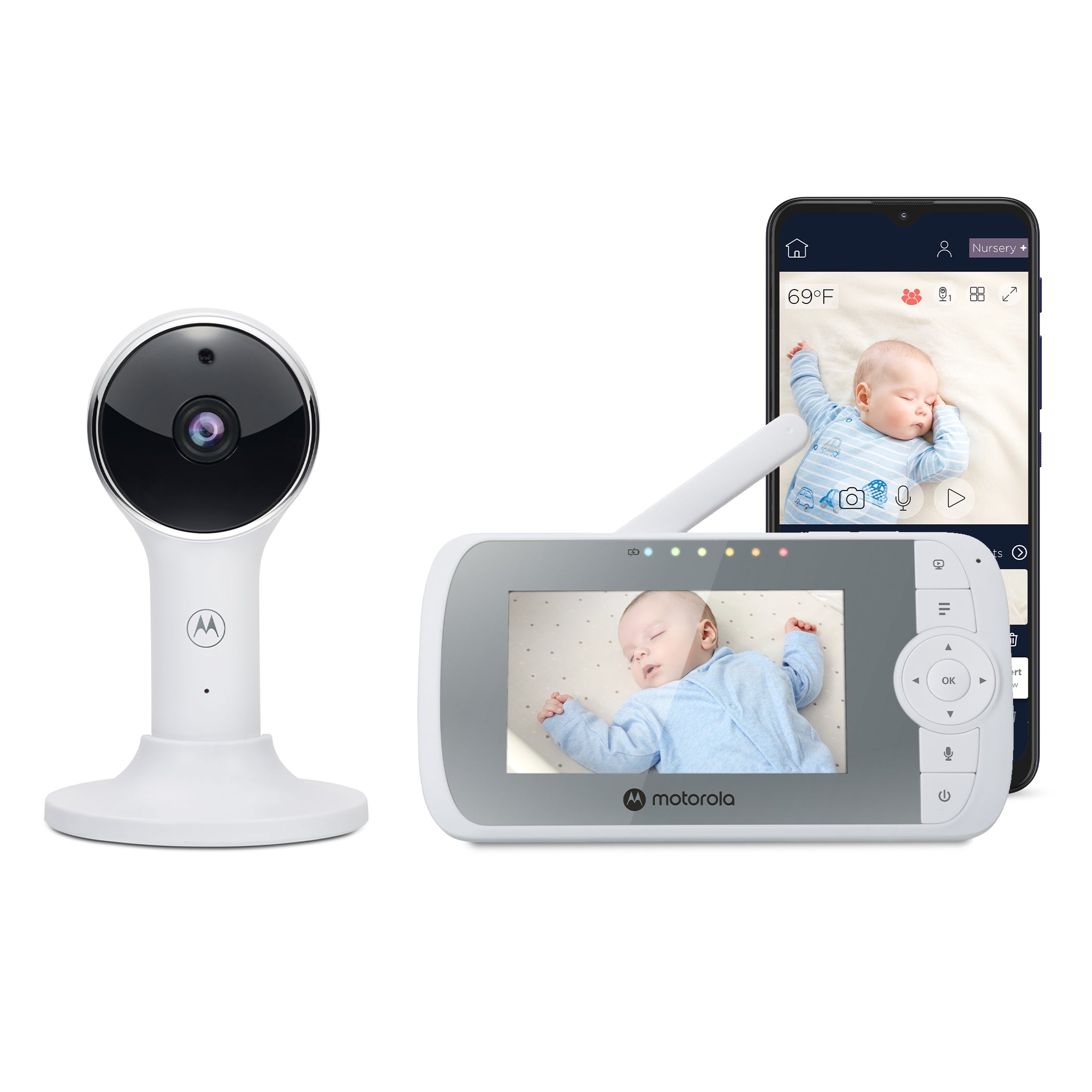
The Motorola Nursery VM64 CONNECT is a hybrid monitor, not an app-only camera: its standard U.S. package contains one camera, one parent unit and their power adapters. The exact U.S. retailer record identifies product 8647780172075 and SKU 810036770873. Motorola’s page showed the package as sold out on October 23, 2026; that dated listing is not proof that every retailer is out of stock or that it will remain unavailable.
At home, camera and receiver pair locally without Wi-Fi. The camera can also join a router for Motorola Nursery app viewing. That is a distinct setup: away-from-home use needs an account, compatible phone or tablet, Internet access and at least 0.6 Mbps upload bandwidth per camera, according to the manual. If your router does not reach the nursery reliably, the parent unit is the simpler path; if you need to check from somewhere else, plan on the app’s network requirements.
The handheld screen and the advertised app picture are different
The receiver is 4.3 inches with a listed 480 × 272 resolution. The camera’s image is advertised as up to Full HD (1080p) in the app, a separate manufacturer claim rather than a measured result or the resolution of the handheld screen. The camera includes infrared night vision, and the receiver keeps its audio feed when its screen is switched off. The signal meter cannot predict reception through your walls.
The VM64’s camera controls need careful wording. The retailer calls them digital pan, tilt and zoom; the user guide calls the parent-unit controls “digital pan and tilt,” then lists 1×, 1.2×, 1.5× and 2× zoom. This moves or enlarges the image electronically. The guide does not establish a motorized camera head physically turning around the room. If it matters that the lens itself sweep to a different physical direction, do not read “digital pan/tilt” as proof of that mechanism. A model with documented motorized head movement, such as the Motorola PIP1515 CONNECT, is a different fit.
Expansion does not change what is in this box
The product page says the family can connect as many as four cameras, and the manual describes split-screen viewing and camera patrol after extra cameras are paired. Its scan mode cycles between paired cameras about every 12 seconds. In split view you can see more than one camera image, but the guide says you select a camera to hear its audio. That is not the same as hearing several rooms at once. More importantly, the exact VM64 CONNECT base SKU reviewed here contains one camera. The user guide and North American quick-start sheet name VM64-2, VM64-3 and VM64-4 family packages, but those documents alone do not establish their U.S. retail SKUs, package counts, stock or exact images; I do not treat them as alternate names for this one-camera box.
For one room, the included camera gives you one selected-room picture and sound. If you have two rooms and need both pictures at the start, shop for an exact two-camera package with a confirmed SKU rather than assuming the family’s extra camera slots mean that two cameras ship in the base box. The U.S. page’s “up to four” claim describes capacity, not included equipment.
Battery and alert claims have limits
The parent unit has a built-in 3.8 V, 2,000 mAh rechargeable battery. The English V5 guide calls its battery life a five-hour maximum; it does not specify the display, brightness or other conditions for that figure, so it should not be treated as a guaranteed continuous-screen run time. The North American quick-start sheet recommends an initial 16-hour charge. On battery power, the user guide offers screen-off timers while audio continues. The camera itself uses its supplied 5 V/1 A adapter at an outlet; the manual does not document battery-only camera operation.
The page advertises app motion, sound and temperature notifications and 24-hour event monitoring. It does not publish thresholds, alert reliability or how long events remain available. The receiver displays a room-temperature reading; the manual says the number turns red below 57°F or above 84°F and shows HH/LL at more extreme readings. Treat it as a room cue rather than a medical or calibrated thermometer. It also includes sound-level LEDs, two-way talk, ten lullabies or soothing sounds and ten English audio books; personal audio recordings are created through the app and played by the camera.
Who should shortlist this exact package?
Consider the VM64 CONNECT if one room, a dedicated receiver that works without home Wi-Fi, and an optional app route suit your routine. Its digital reframing may help adjust what you see without walking over to aim the camera, but it is not confirmed physical pan/tilt. Choose a documented moving camera instead if mechanical room coverage is essential. Choose a verified twin kit if two included cameras are a must-have, and a local-only monitor if you do not want an app account or router setup.
Motorola’s U.S. page claims up to 1,000 feet of local range, but the guide supplies no numerical open-space test method and warns that walls, metal and other 2.4 GHz devices can weaken the link. Try reception at the actual receiver location rather than planning around the maximum. The app documents Android 7 and 0.6 Mbps upload per camera, but its minimum iOS version is inconsistent: the V5 guide’s requirements section says iOS 11, while its setup subsection and North American QSG V7 say iOS 10. Check current app compatibility before relying on an older baseline. If you need a particular runtime, an app notification guarantee or simultaneous audio from two rooms, the reviewed sources do not establish those requirements.
The monitor supports check-ins; it is not a medical device or a substitute for adult supervision. Follow the manual’s mounting and cord-placement instructions. Sources: Motorola Nursery VM64 CONNECT U.S. listing, VM64 CONNECT support page, VM64 CONNECT User Guide V5 and North American Quick Start Guide V7.
Key details at a glance
| Parent-unit screen | 4.3 in |
|---|---|
| Published display resolution | The exact U.S. listing specifies 4.3-inch 480 x 272 pixels; the camera/app listing separately advertises up to Full HD (1080p). The phone resolution is not the parent-screen resolution. |
| Camera-to-parent-unit connection | Two separate arrangements are documented: a local camera-to-parent-unit radio link without household Wi-Fi, and a router-connected camera plus Motorola Nursery app/account for phone viewing away from home. Do not assume that the independent routes have been tested as a simultaneous dual-view setup. |
| Advertised maximum range claim | 1000 ft |
| Cameras in the reviewed kit | 1 |
| Maximum camera units supported | 4 |
| Video rooms visible at once | 1 |
| Phone viewing away from home | Yes |
| User-replaceable parent-unit battery | No |
| Supplied camera lens setup | The guide calls the parent-unit image controls “digital pan and tilt” and lists 1x, 1.2x, 1.5x and 2x zoom. It does not document a motorized camera head physically sweeping the room. |
| Recommended stable operation uses home Wi-Fi | Yes |
| Audio-only system | No |
| Parent talk-back | Yes |
| Room-temperature readout | Yes |
| Parent-unit batteries included | Yes |
| Preloaded lullaby count | 10 |
| Parent receivers included | 1 |
Use the exact model’s instructions for operating limits, supplied equipment and version differences.
Sources for this assessment
- Motorola Nursery exact U.S. VM64 CONNECT listing
- Motorola Nursery exact U.S. VM64 CONNECT Shopify product record
- Motorola Nursery VM64 CONNECT support page, Ref 810036770873
- Motorola VM64 CONNECT English User Guide V5 (EN-EU&US)
- Motorola VM64 CONNECT North American Quick Start Guide V7
- Motorola Nursery U.S. all-products navigation candidate
- Official exact Motorola Nursery VM64 CONNECT U.S. listing image
- U.S. CPSC SaferProducts exact-name VM64 CONNECT query

Check the room and the receiving setup.
Read the exact model's constraints, camera count and supervision limits before choosing a package.