
Your needs, this model
Does it fit your priorities?
Would two local camera pictures help you check two rooms at once?
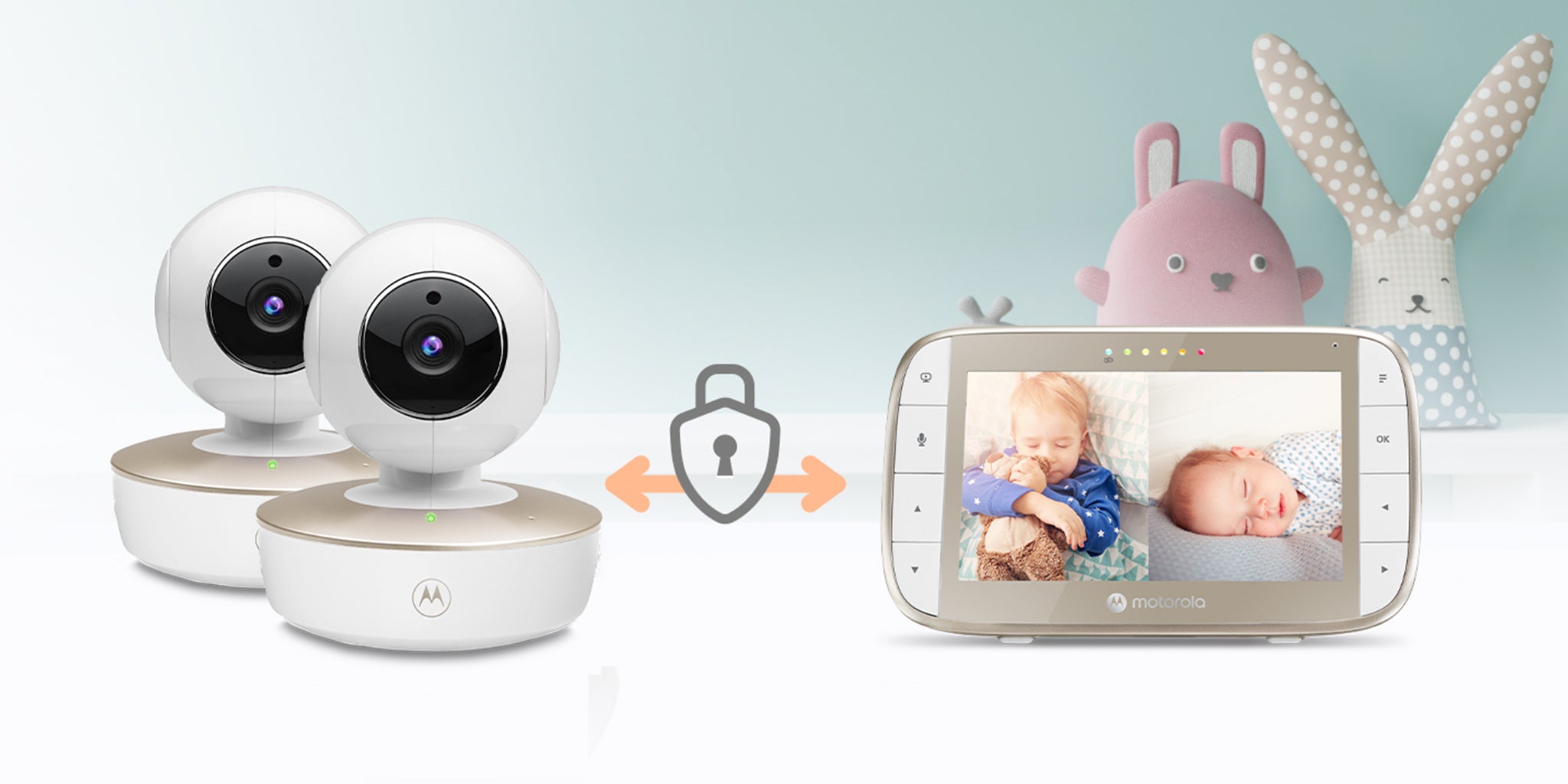
The exact Twin Pack includes two cameras and the shared family guide documents Split Screen for multiple pictures; only selected-camera audio is heard.
Explore this need in the finder →Do you need to hear both rooms at the same time?
The Twin Pack's split view shows both pictures, but the manual says only one selected camera supplies audio.
Explore this need in the finder →Is a two-camera package preferable to buying one camera now?
The exact VM50G-2 record and support page identify a separate Twin Pack with two included cameras; the standard VM50G is a one-camera kit.
Explore this need in the finder →A real two-camera kit, not two-room audio
The Motorola Nursery VM50G-2 Twin Pack is the exact two-camera version of the VM50G local video monitor. Its U.S. product record and support page identify SKU 810036771139 and the package name “VM50G-2 TWIN PACK”; the product listing showed Sold Out on October 23, 2026. This distinction matters more than the shared screen: the standard VM50G SKU 810036771122 includes one camera, while this separate product includes two. The paired units send video directly to the dedicated parent receiver over 2.4 GHz FHSS, with no home Wi-Fi, app or internet required for that screen.
The main reason to choose the twin kit is seeing both camera pictures at once on the five-inch screen. It is not a way to hear both rooms continuously. The exact family manual says split-screen presents multiple camera images but only one camera’s audio is heard at a time. You select which camera supplies sound and talk-back. If simultaneous two-room listening matters as much as simultaneous video, look for a system whose own guide confirms both audio feeds together.
What the second camera adds
The two included cameras each support remote motorized pan and tilt, 2× digital zoom, infrared night vision, lullabies and parent talk-back. The ability to reframe each view from the parent receiver can help when two rooms need cameras fixed in safe locations. It does not mean the camera can be placed within a child’s reach: the guide says to keep camera units and cords more than three feet away and never put them in a crib.
When Split Screen is on, the parent display can show several registered cameras at once; the red frame marks the camera whose audio is selected. The TALK button works with that selected camera. Zoom does not work in multi-screen mode, and the manual says to choose a lullaby before opening multi-screen if you want it to play through a camera. If you prefer a single full-sized picture, choose one camera directly. The scan function instead rotates through registered cameras at roughly 12-second intervals; it is sequential viewing and does not produce simultaneous sound.
That makes the extra camera worthwhile for parents who want side-by-side room awareness, but less decisive for a user who will ordinarily watch one room or move one camera between rooms. In that case the one-camera VM50G provides the same screen, receiver controls and local connection. The guide supports up to four paired cameras, but the reviewed Twin Pack contains two and the -3/-4 kit counts should not be inferred from a manual family label alone.
Screen and connection limits
The receiver’s five-inch display is specified at 480 × 272 pixels. It is a bigger physical panel than a compact viewer, but it is not a documented 720p screen. Night vision switches to a black-and-white picture in darkness, and the parent-unit volume can be adjusted independently. If the screen is off, the manual says audio monitoring remains active.
The direct 2.4 GHz radio path can suit households that prefer a separate receiver and do not want to add this system to Wi-Fi. It also means there is no away-from-home phone feed: a parent must be within radio range of the receiver. The advertised maximum is up to 1,000 feet, but the guide gives no numeric open-space test conditions and warns that walls, metal, electrical equipment and other 2.4 GHz products can weaken the signal. Confirm the link in the intended rooms rather than planning around the headline number.
Battery and power require advance planning
The parent display contains a built-in 2,000 mAh lithium-ion battery. Motorola states up to five hours of operation and recommends a 16-hour charge before first use; the manual says the battery is not user-accessible. Those are useful planning figures for carrying the parent unit around the home, not a test of guaranteed continuous screen-on time. The display can be switched off while leaving audio on, and a battery-saving video timer can blank it after five, 30 or 60 minutes. Choose the twin kit expecting to keep the camera units on their supplied adapters rather than treating it as a wire-free room setup.
The camera needs its own power adapter; the manual specifically says the VM50G camera battery indicator is not applicable. Two cameras therefore mean two cord-and-outlet locations to plan. Use the included power supplies, avoid extension cords, keep every cord out of the crib and at least three feet from the child, and test both camera links before relying on the system.
Temperature, alerts and the decision boundary
Each camera reports a room temperature on the viewer. The manual says the screen reading turns red below 57°F or above 84°F and switches to LL/HH at more extreme readings. Although the store copy describes temperature alerts, the guide primarily documents that visual color change and temperature scale; it does not establish a user-programmable alarm threshold. Use the displayed value as a household cue, not a medical measurement.
The kit fits a family that needs two pictures visible at once, can accept one selected audio source, wants remote camera aiming, and prefers a local receiver without Wi-Fi. Choose the single VM50G if only one camera is needed. Reject the Twin Pack for two simultaneous room-audio feeds, phone access from elsewhere, portable battery-powered cameras, a 720p screen, a measured open-space range threshold, or a specified all-night screen-on runtime. A two-camera package expands what you can see, but it does not remove the routine’s need to choose which room you hear.
Sources: Motorola Nursery VM50G-2 U.S. listing, VM50G-2 product record, VM50G-2 support page, the shared exact-family U.S. user guide and North American quick-start guide.
Key details at a glance
| Parent-unit screen | 5 in |
|---|---|
| Published display resolution | 5-inch color LCD; exact U.S. listing states 480 x 272 pixels, not 720p. |
| Camera-to-parent-unit connection | Direct local 2.4 GHz FHSS camera-to-parent connection; exact Twin Pack U.S. listing says no Wi-Fi or app is needed. |
| Advertised maximum range claim | 1000 ft |
| Cameras in the reviewed kit | 2 |
| Maximum camera units supported | 4 |
| Video rooms visible at once | 2 |
| Phone viewing away from home | No |
| User-replaceable parent-unit battery | No |
| Supplied camera lens setup | Two remote motorized pan-and-tilt cameras; selectable 1x/2x digital zoom; zoom unavailable in multi-camera split-screen. |
| Recommended stable operation uses home Wi-Fi | No |
| Audio-only system | No |
| Parent talk-back | Yes |
| Room-temperature readout | Yes |
| Parent-unit batteries included | Yes |
| Camera-side mood light | No |
| Preloaded lullaby count | 5 |
| Parent receivers included | 1 |
Use the exact model’s instructions for operating limits, supplied equipment and version differences.
Sources for this assessment

Check the room and the receiving setup.
Read the exact model's constraints, camera count and supervision limits before choosing a package.